
BGB
Accurate Game Boy emulator with a powerful debugger
- BewareDeveloper
- 27 Sep 2026Page Updated
Details
- Developer
- Beware
- Page Updated
Supported Systems
Platform Support
- Windows
Screenshots
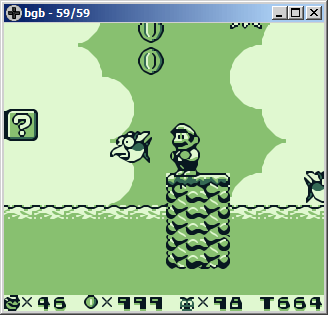
Overview
BGB is an emulator and debugger for the Game Boy, Game Boy Color and Super Game Boy. Its goal is to emulate the hardware accurately.
That accuracy means games run as they would on the original system, and it also makes BGB a powerful debugging tool.
As a result, the emulator has excellent game compatibility.
BGB can also emulate the link cable over a network, letting two copies of BGB link up on one PC or across a local network.
Which download to pick
Both buttons are the same release, BGB 1.6.6. Windows (64-bit) suits any current PC. Windows (32-bit) is for 32-bit copies of Windows and very old machines. There is no native macOS or Linux version, but both builds run under Wine on those systems.
System requirements
BGB is very light. Its author aims to keep it working on both old and current PCs, and the website says it still runs on Windows 95 with a Pentium. Link play is the exception: the manual asks for a 1-2 GHz PC and under 1 ms of lag between the two copies, which means the same machine or a fast local network.
Getting started
- Drag a game onto the window, or right-click inside it for the menu and open a file from there. Zipped games load directly.
- Right-click menu > Options holds the controls: “configure keyboard” and “configure game controller” map the buttons.
- A boot ROM is not needed. To see the real startup sequence, or to let the Game Boy Color boot ROM colour original Game Boy games, turn on the boot ROM in the System tab of the options and point it at a boot ROM dumped from your own console.
- For link play, choose “listen” in one copy and “connect” in the other. The title bar shows “linked” when it works.
- Press Esc to open the debugger.
Key Features
Accurate Hardware
Aims to emulate the hardware accurately, so games run as on real systems.
Built-In Debugger
A powerful debugging tool, opened with the Esc key.
Network Link
Emulates the link cable between two copies on one PC or a network.
Very Light
Its website says it still runs on Windows 95 with a Pentium.