Project Helghast
PC port of Killzone 3
- RecompilationPort Type
- undecupleDeveloper
- 15 Nov 2026Page Updated
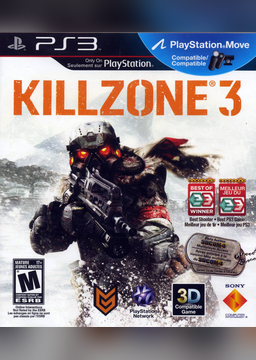
Details
- Developer
- undecuple
- Port Type
- RecompilationA tool translated the game's original machine code into C automatically, which was then built as a native PC program.
- Game
- Killzone 3
- AI Use
- Mostly AI-builtThe project says: “The agents do most of the hands-on work: reading the game's binary and the reference material, writing and testing patches, tools and documentation, and running the builds and test runs.” Source
- Source Code
- GitHub
- Support the Developer
- Ko-fi
- Page Updated
Platform Support
- Windows
Screenshots
PS3_GAME or as a decrypted .iso, plus the game’s 1.14 update and its decrypted 1.14 EBOOT.elf, all from your own copy. Windows 10 or 11 (64-bit) with a Direct3D 12 graphics card; Linux through Proton also works.Overview
Project Helghast is an unofficial native Windows port of Killzone 3, Guerrilla Games’ 2011 PlayStation 3 shooter, made by static recompilation with ps3recomp and drawn with Direct3D 12. It is not an emulator and not a rewrite: the game’s own code is translated and compiled on the player’s computer, from their own disc and update, and neither the installer nor the portable zip carries any game code, assets or keys.
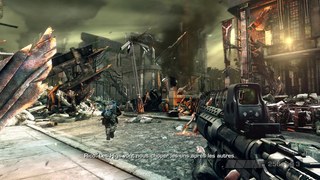
It is an early pre-release. All nine chapters load and play, and one has been played by hand to its end, but levels run at about 16 to 22 fps against the original’s 30, audio stutters at times, far windows and sky can look flat white, and the campaign has not yet been finished in one run. Most of the testing so far has been on Linux through Proton.
The port adds native mouse look, rebindable keyboard and pad controls that follow the keyboard layout, button prompts for PlayStation, Xbox and keyboard, a Hor+ view for ultrawide and 16:10 screens, a field of view setting, a 30, 60 or 120 fps limit, VSync and bloom settings, a quit to desktop option and split-screen co-op with one player on the keyboard. It also brings Chinese, Korean, Russian and Japanese text from open fonts when the system fonts are missing.
How to Set It Up
- Download the Windows setup (recommended) or the portable zip. Don’t install into a OneDrive folder.
- Run the setup and point it at your disc dump, the 1.14 update and the decrypted 1.14
EBOOT.elf. With the portable zip, runrun.cmdonce instead. - It translates and compiles the game’s code on your PC, which takes about 10 minutes on a fast machine.
- Start the game with
Project Helghast.exeor its shortcuts, neverkz3.exedirectly. Display, input and frame rate settings are in the game’s Options menu.
Advertisement
Download Project Helghast
Enjoying undecuple's work? You can support them on Ko-fi.
What's new in v0.1.10
Project Helghast 0.1.10, a pre-release: partly playable, see docs/RELEASE-CRITERIA.md. New in 0.1.10:
Fixed
- On Windows, game files with long names could not be written to the port’s disk cache when the full path went past Windows’ 260-character limit. The next area then failed to load, which showed as a black screen after the HAMR section in chapter 2 (Pyrrhus Evac). Cache files now have short fixed-length names, and the cache is filled again on the first start after updating; files cached by earlier versions are left in place and no longer used. Reported by TimothyDong (#38).
See CHANGELOG.md for the full list.
Windows installer and portable zip. You need your own Killzone 3 disc dump (a folder or a decrypted ISO), the 1.14 update and a decrypted EBOOT from your own copy; none of them is included or downloaded. SHA-256 sums: SHA256SUMS (and the .sha256 files). See the README for what it does and what goes online.
dfd9559fe1576fd93f57b57e893cc1f2e80f76135da3b10090bc00b426737c43
f988ea167749e4ed70e12a0ed70ae8758d216c7c0c15ffbde1492f12d729de8a
4f8912dd7b17f171d1a8257815d70c5b622b463a20875b3672d6bd2223617f29