SafeHouse
PC port of Sly 2: Band of Thieves
- DecompilationPort Type
- FridiNaTor1Developer
- 18 Nov 2026Page Updated
Details
- Developer
- FridiNaTor1
- Port Type
- DecompilationThe game's code was rewritten by hand as source code that builds back into the same game, then made to run natively on PC.
- AI Use
- Not statedThe developers haven't said whether they used AI.
- Logo
- AI-made fan logo, free to use · Full size
- Source Code
- GitHub
- Support the Developer
- Patreon
- Page Updated
Platform Support
Screenshots
Overview
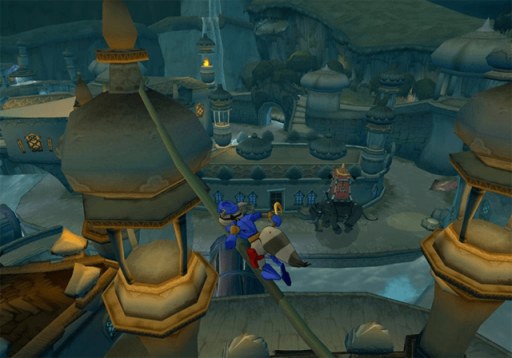
SafeHouse is a launcher that installs the Sly Cooper games from the player’s own PlayStation 2 disc images and runs them as native programs, with no emulator and no BIOS. Sly 2: Band of Thieves is a native port built from the Sly 2 decompilation and is playable from start to finish. The first game, Sly Cooper and the Thievius Raccoonus, comes from theclub654’s ProjectCane port, which SafeHouse grew out of, and Sly 3: Honor Among Thieves is at an early stage on the Sly 2 port’s engine: it installs and plays its opening movies, but the game itself is still being ported. No game data is included.
The ports add keyboard and mouse controls with remapping and mouse camera and aim, prompts for Xbox, PlayStation, Switch, Steam Deck and Steam controllers (or the original PS2 icons) that switch to whatever is in use, and frame rates from 30 up to 240 FPS or uncapped with the game’s speed unchanged. Screens up to 32:9 keep the HUD at its original 4:3 shape. Every region is supported, both European versions in all their languages and the Japanese Kaitou Sly Cooper 2 among them.
Mods can replace textures, music, dialogue, text and movies, and the launcher can import the HD textures from the PS3 Sly Collection. A debug menu adds extras such as playing as Carmelita, guards or bosses, flying Bentley’s RC chopper, noclip, a free camera and warps, alongside replays of favourite jobs, 30 save slots and long shadows. A Nintendo Switch homebrew build is also published on the project’s own releases page.
How to Set It Up
- On Windows, run the setup, or extract the portable zip and open
SafeHouse.exe. On Linux or the Steam Deck (in Desktop Mode), make the AppImage executable and open it. On macOS, open the app with right-click and Open the first time. - Pick a game, choose Install and select or drag in your disc image. SafeHouse checks the game, its region, the free space and that the image is complete.
- Choose Play. On the Steam Deck, Add to Steam on the game’s page puts it in the library.
- The launcher checks for a new release when it starts and updates itself, leaving saves and installed games alone.
Advertisement
Download SafeHouse
Enjoying FridiNaTor1's work? You can support them on Patreon.
What's new in v0.1.94SafeHouse 0.1.94
SafeHouse 0.1.94, built 2026-11-15 from 91f7dad3.
Changes
- Fix Sly 2 Clockwerk disappearing
Downloads
| For | File |
|---|---|
| Windows, installer | SafeHouse-Launcher-Windows-x86_64-Setup.exe |
Windows, portable (unzip and open SafeHouse.exe) | SafeHouse-Launcher-Windows-x86_64-Portable.zip |
| Windows on ARM, installer | SafeHouse-Launcher-Windows-arm64-Setup.exe |
| Windows on ARM, portable | SafeHouse-Launcher-Windows-arm64-Portable.zip |
| Linux and Steam Deck, AppImage | SafeHouse-Launcher-Linux-x86_64.AppImage |
| Linux, archive | SafeHouse-Launcher-Linux-x86_64.tar.gz |
| Linux on ARM (Steam Frame), AppImage | SafeHouse-Launcher-Linux-aarch64.AppImage |
| Linux on ARM, archive | SafeHouse-Launcher-Linux-aarch64.tar.gz |
| macOS, Apple silicon | SafeHouse-Launcher-macOS-arm64.dmg |
| macOS, Intel | SafeHouse-Launcher-macOS-x86_64.dmg |
Nintendo Switch (homebrew, copy to sdmc:/switch/SafeHouse/) | SafeHouse.nro |
The launcher updates itself (Settings > Launcher > Check for updates). SHA-256 checksums are in SHA256SUMS.
On macOS, open the app with right-click > Open the first time. The packages contain no game data.
9ae3734a0c68acc29384d477482c5d0eb1eb888f56ec78572f9c0a484e9e567b
2c75226fb816162a997d5a1fcbf643495599c93674e8c153630ed56ecd5ed16e
d3ca4685feb475ccd1c49ec1a330d31f1a4bf532f12b77552e0d16463ae94bc3
b70ebf1f62a8702dbe1b0b80b6d4654d61df206cc8efca6bff7a612a22a3626c
267b9c045073a5e76e840aa664544f286e8fcc4f16740e706e36ad8bb712fdd2