Shadow of Rome Recompiled
PC port of Shadow of Rome
- RecompilationPort Type
- KorvonordicoDeveloper
- 12 Nov 2026Page Updated
Details
- Developer
- Korvonordico
- Port Type
- RecompilationA tool translated the game's original machine code into C automatically, which was then built as a native PC program.
- Game
- Shadow of Rome
- AI Use
- Mostly AI-builtThe project says: “Claude wrote most of the code, the scripts and the patches, and ran the tests.” Source
- Source Code
- GitHub
- Page Updated
Platform Support
- Windows
Screenshots
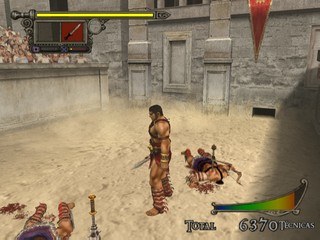
SLES-52950), or of its Russian translation, as an .iso file. Windows 10 or 11 64-bit with DirectX 12, DirectX 11 or Vulkan.Overview
Shadow of Rome Recompiled is an unofficial PC version of Capcom’s 2005 PS2 action game Shadow of Rome, made by translating the game’s own code into a Windows program with PS2Recomp. The graphics card draws the game: up to eight times the PS2’s resolution, 60 frames a second, in 4:3, 16:9 or 21:9, with DirectX 12, DirectX 11 or Vulkan. No game files are included; it reads the player’s own European disc image, or its Russian translation.
A launcher with Play, Options, Graphics, Controls and Mods pages starts the game and holds every setting: a window or full screen, music and effect volumes, smoothed audio when the game slows down, field of view, sharpening, FXAA and a mouse with every key rebindable. ReShade comes with it, off at first, and the European disc’s five languages are picked on the game’s first screen.
It is still being tested. Chapter 1 has been played to the end, but chapters 2, 3 and 4 haven’t been played by hand yet, and there may be graphics glitches or crashes, so the developer suggests saving often. The developer says Claude wrote most of the code under their direction.
How to Set It Up
- Download the zip and extract it into a folder of its own.
- Run
ShadowOfRome.exe. Windows may say the program isn’t known: choose More info, then Run anyway. - Choose Play. The first time, pick your
.iso: the launcher reads the files it needs into thediscofolder and remembers the image, so keep it where it is. - Change the picture, sound and keys in the launcher’s Options, Graphics and Controls pages. On the game’s first screen, pick its language.
Advertisement
Download Shadow of Rome Recompiled
What's new in v2.9.2Shadow of Rome Recompiled 2.9.2
- Fixed: with Vulkan, ReShade started even with RESHADE off. A ReShade installed with its own setup for Vulkan games starts in every Vulkan program that has a
ReShade.ininext to it, and the package has one. Now RESHADE off turns it off for this game too. Thanks to @n0l4n666, who saw it. - README: clearer about ReShade and Vulkan: the ReShade in the package does not work with Vulkan (use DirectX 12 or 11); a ReShade installed separately with ReShade’s own setup can still start, and RESHADE off now turns it off.
Everything else is as in 2.9.1. Download ShadowOfRome-2.9.2-windows.zip and unpack it into a new folder; your settings and saves from an older folder can be copied over.
48c26dfe55c59f52ca381414e9ef35b6f5908ee0b7d722ac3a74d45bde08a8f3
485212c3964e0a05930689dae548d080689e391a6376f46537b8716f929b5cc7