ReRAC
PC port of Ratchet & Clank
- ReimplementationPort Type
- ReRAC contributorsDeveloper
- 28 Oct 2026Page Updated
Details
- Developer
- ReRAC contributors
- Port Type
- ReimplementationThe game was rebuilt in new code that plays like the original and loads its data from your own copy.
- Game
- Ratchet & Clank
- AI Use
- AI-assistedAn AI coding tool is credited as co-author on 460 of the last 520 commits. Source
- Source Code
- GitHub
- Project Site
- re-rac.github.io
- Launcher Source
- GitHub
- Page Updated
Platform Support
- Windows
- Linux
- macOS
Screenshots
Overview
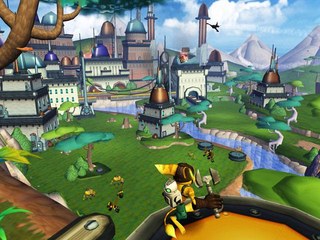
ReRAC rebuilds Ratchet & Clank, Insomniac Games’ 2002 PlayStation 2 platformer, as a native PC program written in Rust on the Bevy engine. Instead of emulating the console, it carries the game’s own systems over one by one, so the levels, enemies, weapons and cutscenes behave as they did on the PS2. The game data, from models and levels to sound and movies, is read from the player’s own disc.
The project is an early alpha and is not yet playable from start to finish. Every planet from Veldin to Drek’s fleet loads with its enemies, machines and bosses, and saving, loading, flying between planets, the Gadgetron vendor and cutscenes with their music work, while the later planets are still being played through and fixed with each release. The game runs at up to 60 frames per second, and its Port Options add 16:9 and 16:10 widescreen, rendering resolutions from 416p up to 2160p, fullscreen, anti-aliasing, texture filtering, detail distance and HUD scaling, each starting at the look of the original on a TV.
Players install it through the ReRAC Launcher, which downloads and switches between ReRAC versions, checks the disc, extracts its data and starts the game. The launcher can also export the game’s textures, audio, models, levels and text to common formats, and mod management is planned. The macOS builds are the tested ones; the Windows and Linux builds are newer and less tried. The game builds on this page can be added to the launcher by hand. Neither the launcher nor the game contains any game data.
How to Set It Up
- Download the ReRAC Launcher for your system: the
.msiinstaller for Windows, the.AppImagefor Linux or the.dmgfor macOS (Apple Silicon or Intel). - On macOS, drag the launcher into Applications; the first time it is blocked, allow it under System Settings, Privacy & Security, Open Anyway. On Linux, allow the
.AppImageto run as a program. - In the launcher, open Settings, Version Management, Official and install a ReRAC version, then set it active. A game build downloaded from this page can instead be added under Development with Install from zip.
- Pick Ratchet & Clank in the sidebar, choose Install via ISO and select your disc image. The launcher checks the disc and extracts the game data once.
- Press Play. Aspect ratio, resolution, fullscreen and the graphics options are under Options, Port Options in the game.