rac-rs
PC port of Ratchet & Clank
- RecompilationPort Type
- AsobiCodesDeveloper
- 25 Nov 2026Page Updated
Details
- Developer
- AsobiCodes
- Port Type
- RecompilationA tool translated the game's original machine code into C automatically, which was then built as a native PC program.
- Game
- Ratchet & Clank
- AI Use
- AI-assistedAn AI coding tool is credited as co-author on 20 of the repository's 23 commits. Source
- Source Code
- GitHub
- Original Release
- asobicodes.dev
- Page Updated
Platform Support
- Windows
- Linux
Screenshots
Overview
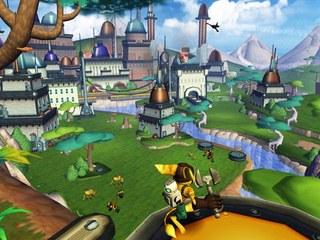
rac-rs is an unofficial PC port of Ratchet & Clank, Insomniac Games’ 2002 PlayStation 2 platformer, written in Rust. Its setup statically recompiles the PS2 code on the player’s own disc into native Rust and runs it on a PS2 processor core written in Rust, so the game logic is the original code and plays one to one with the console. Graphics, sound, movies, input and saving are new PC code, and where a fix or a PC feature needs it, an original function is rewritten by hand and checked frame by frame against the original.
The whole game can be played from power-on to the end credits, New Game+ included. On top of the original it adds widescreen, keyboard and mouse controls, Xbox and PlayStation controller support, and an optional modern camera with mouse look and strafing. A Graphics page offers enhanced lighting, ambient occlusion, dynamic shadows, reflective water, better smoke, fire and explosions, and sun rays, while the Classic settings keep the PS2 look.
It runs on Windows and Linux, and version 0.5 added NVIDIA DLSS and AMD FSR upscaling and frame generation, remappable keyboard, mouse and controller controls, and an animated Galactic Map with fast travel. The European disc is the most tested; the USA disc has been supported since version 0.2. Clank’s jetpack can drift out of step with Ratchet and some glass can flicker. rac-rs is a separate project from ReRAC, which rewrites the game from scratch instead of running its original code. The download holds the project’s own code, its tools and NVIDIA’s and AMD’s upscaling libraries, with no game data: setup builds everything inside its own folder from the player’s disc.
How to Set It Up
- Download the
rac-rszip and unzip it anywhere. - On Windows, double-click
Setup.cmd, click Browse and pick your.iso. When it shows Disc OK, click Install. - Wait while setup downloads its own private Rust, Python and assembler and builds the game from your disc (about 15 minutes, longer on slower PCs), then click Play.
- Later, start the game from the desktop shortcut. It offers updates when a new version is out, and Setup.cmd has Repair / rebuild.
- On Linux, run
sh setup.shin the unzipped folder and then./play.sh, or install it from the separate RAC-RS Launcher. No programming tools or sudo are needed.
Advertisement
Download rac-rs
What's new in v0.5.1RAC-RS v0.5.1
Ratchet & Clank PC port, bring your own disc. No game files are included.
Install: download rac-rs-0.5.1.zip below, unzip it, double-click Setup.cmd, click Browse and pick the .iso of your own disc (PAL/Europe v1.00 or USA v1.00), then click Install. Already on v0.5.0? Just start the game (or use the launcher): it offers the update and keeps your saves and settings.
Linux: install it with one click from the RAC-RS Launcher (github.com/AsobiCodes/rac-rs-launcher, the Linux download rac-rs-launcher-linux-x64.tar.gz: extract it and double-click the launcher), or unzip the game, run sh setup.sh and then ./play.sh. No programming tools and no sudo are needed.
Highlights
- Keyboard and mouse rebuilt as their own system: two keys or mouse buttons per action, side buttons and the wheel included, and a mouse invert of its own.
- Controller remapping: every action on any of the 16 buttons, with the button pictures in the game’s texts following your remap.
- Fire light v2: every fire is a real light with its real size and colour, and the strongest fires cast soft shadows from the flames.
- Heat haze above fires, burning enemies and lava.
- Frame Generation: FSR 2x, and DLSS 2x, 3x and 4x on NVIDIA RTX 40 and 50 cards.
- DLSS preset: Auto now uses the faster preset K; other presets in the RAC-RS Launcher.
- New Resolution, Brightness and Contrast options.
- Speed: MSAA switches itself off while DLSS or FSR runs, and the fire scenes no longer hold the graphics card back.
- A shorter Options menu, less gloss on painted metal, clouds that match each planet’s PS2 sky, denser fur.
- An animated Galactic Map and a Fast travel option that skips the space flights.
- Fixes for black travel sequences and Eudora music (#74), the classic menu frames and far floors (#79), and more.
Changes since v0.5.0
- Updating from v0.5.0 keeps your saves and settings. Your key settings and controller settings are converted to the new controls on the first start (nothing to redo).
- Linux: update with one click from the RAC-RS Launcher, or unpack the new release over the game folder and run
sh setup.shagain. The new RAC-RS Launcher v0.1.6 has rows for the settings that moved out of the game’s menu (DLSS preset, Underwater look, Edge smoothing (MSAA), Waves).
Controls
- New: keyboard and mouse are their own system now (issues #77 and #78). Every game action (Jump, Wrench, Fire, Quick Select, Look, Crouch and the others) has two slots, and each slot can be a key, a mouse button (left, right, middle, and the side buttons Mouse 4 and Mouse 5) or the mouse wheel. Modern menu: Options > Controls is a table (action, 1st, 2nd): Enter or a click captures a slot, Tab picks the 2nd slot, Del clears it, and Pause always keeps at least one key. Classic menu: the Controls pages do the same row by row. On-screen hints and tutorial boxes name the key or mouse button you bound.
- New: the controller is remapped the same way. Every game action (Jump, Wrench, Fire, Quick Select, Look, Crouch, Map, Pause, the d-pad, L3 / R3, Aim) has two controller slots, each any of the 16 buttons. Modern menu: Options > Controls has a switch “Keyboard & mouse | Controller” over the same table. Classic menu: the pages Controller 1/3 to 3/3 (Cross = 1st slot, Square = 2nd slot, L3 or Del = clear). A button used by two actions shows “x2”, and Aim takes over its button while you aim. Menus keep the standard layout whatever you remap (Cross / A confirms everywhere); only gameplay follows your remap.
- New: the button pictures in gameplay texts follow your controller remap: tutorial and hint boxes, Helpdesk pages, the L1 / R1 of the Quick Select ring, and the pad picture in Help > Controls (changed labels are rewritten in the game’s own lettering, with extra lines such as “D-Up: OmniWrench” for buttons the picture has no label for).
…
4890de3f2785cdbbeea7abc3ae3eb6321d0e47f0df51d270104b4493afb2d484
648dccd9ee45fc282c15bb4230d73405b0285dae206b846e1cb1ea681ceb9cfa