Team Buddies Recompiled
PC port of Team Buddies
- RecompilationPort Type
- AlexbeavDeveloper
- 16 Nov 2026Page Updated
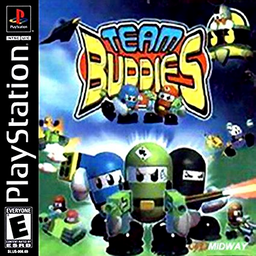
Details
- Developer
- Alexbeav
- Port Type
- RecompilationA tool translated the game's original machine code into C automatically, which was then built as a native PC program.
- Game
- Team Buddies
- AI Use
- AI-assistedThe project says: “This project was developed with AI assistance. AI assists with code, documentation, and investigation; Alex tests the game and makes release decisions.” Source
- Source Code
- GitHub
- Page Updated
Platform Support
Screenshots
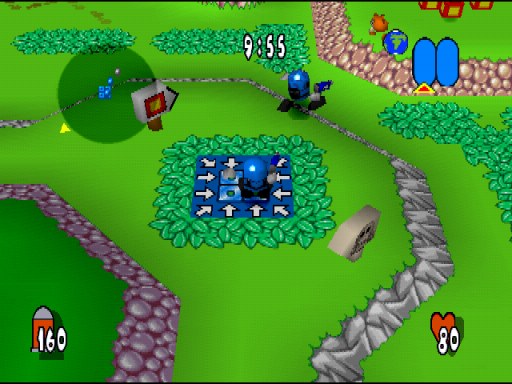
Overview
Team Buddies Recompiled is a PSXRecomp build kit that turns Team Buddies into a native Windows, Linux or macOS program. Instead of emulating the PlayStation, it translates the game’s code into C and compiles it: the download holds only the recompiler, the recomp-ui launcher and a setup wizard, and the wizard does the translating and compiling from your own disc on first run, which takes several minutes.
Its options include rendering above the original resolution, PGXP geometry correction, image filtering, a CRT filter and faster loading, with save states, rewind and input replays in the launcher. Version 0.1.1 passed the author’s automatic build and package checks for all four platforms, and on Windows a test build replayed its one recorded route to the end without crashing. Setup was checked on Windows with the released package, but gameplay and setup on Linux and macOS are unverified, so it is an early release. Loading the Battle Hill stage after the story movie, and play beyond the menus, have not been tested.
The author says AI helps with the code, documentation and investigation, while the author tests the game and makes the release decisions. The download contains no game data or BIOS. It needs Team Buddies (Europe, SCES-02986) dumped from your own disc, and a European SCPH-5552 BIOS dumped from your own console.
How to Set It Up
- Download the zip for your system: Windows x64, Linux x64, or macOS for Apple Silicon or Intel.
- On Windows the setup wizard downloads the build tools it needs; on Linux and macOS install CMake, Ninja, Python 3 and a C/C++ compiler first.
- Extract the zip into a writable folder and run
Team_Buddies(Team_Buddies.exeon Windows). - In the setup wizard select your CUE file (keep its BIN files beside it) or CHD and your BIOS dump, then choose Generate & rebuild.
- The first run compiles the game and takes several minutes; later launches start it directly.
Advertisement
Download Team Buddies Recompiled
What's new in v0.1.1
Team Buddies 0.1.1 moves from psxrecomp pin I 0.1.19 (v0.1.0) to pin I 0.1.23 (psxrecomp 578bd3b, recomp-ui 5302f1f). Nothing else changes in this title’s repository.
Changes
- OpenGL renderer above 1x render scale: a column drawn as one triangle with a one-pixel short side is now filled whole, as the PlayStation does; before, thin vertical stripes could show. Native (1x) output does not change.
- Movies shown in 24-bit colour stay 24-bit when the game moves them inside video memory; before, they could flicker.
- Two of the game’s graphics transfers (DMA) are handled as the PlayStation does; before, some menus could be drawn over the previous frames.
- OpenGL renderer: more exact triangle edges and one-pixel strips, closer to the software renderer.
- Interlaced (480i) screens: the field on display is no longer drawn over.
- Movies are shown uncropped by default.
- In-game menu: Restart game (a cold boot of the disc), the look rows (renderer and picture options), window size, volume, controller 1 port and disc reinsert.
- New Advanced setting, GPU drawing time (Settings > Advanced), off by default. It times the GPU’s drawing as the PlayStation does; only a few games need it.
- Team Buddies: turn on Settings > Advanced > GPU drawing time, or the game stops on the first level’s loading screen.
What to do. Download 0.1.1 and run setup again with the same disc and BIOS.
Tested. Packages for Windows x64, Linux x64, macOS Apple Silicon and macOS Intel. All four passed the CI build and the release package gate (archive audit and native generator start); on macOS the gate’s rule against Homebrew libraries was waived (see Known issues). On Windows, a build of this title on pin I 0.1.23 played every recorded route of Team Buddies to its end, without a crash. That check compares memory, not the picture, and is not a play test. No setup run and no play test was made from these exact packages. Report any problem in the issues. This release does not claim gameplay quality.
Known issues.
- macOS: the setup program is linked to three Homebrew libraries (openssl, freetype, harfbuzz) and does not start on a Mac without them. The release package gate has a rule against this; it was waived for this release.
- Linux and macOS: setup needs Python 3.10 or newer.
- Windows, first install: when setup has built the game, the game can ask for the BIOS again. Select the same SCPH-5552 file once more; it is remembered from then on. A later framework update fixes this.
More games. Every released port is listed at When a new wave is released, its games are added there.
Source:e90fda622c104fbbe0f2a52145dbdb535342c09f. Check downloads against SHA256SUMS.txt; RELEASE-MANIFEST.json records the exact archives and build provenance.
ffb005d1189b6c6006c44fa92502a93296ebdef62443b59745b7574560a7eb97
fcff9d49ec1b64d197797dbce3cd549d4484f4457aad7272791f8301402121f2
5e80d6049776d6a741bdf8e2da2f74c9ba0453958cb83967b05efb58ddf1cc91
2e33686d34a7482ca2cdc0fbbd6c93ebd03968b8004db8ecf3776b85962be2e8