Pro Pinball: Timeshock! Recompiled
PC port of Pro Pinball: Timeshock!
- RecompilationPort Type
- AlexbeavDeveloper
- 16 Nov 2026Page Updated

Details
- Developer
- Alexbeav
- Port Type
- RecompilationA tool translated the game's original machine code into C automatically, which was then built as a native PC program.
- AI Use
- AI-assistedThe project says: “This project was developed with AI assistance. AI assists with code, documentation, and investigation; Alex tests the game and makes release decisions.” Source
- Source Code
- GitHub
- Page Updated
Platform Support
Screenshots
Overview
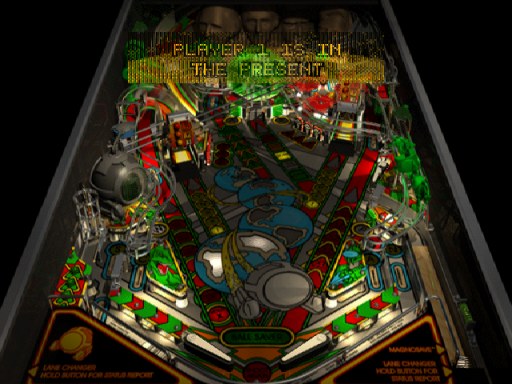
Pro Pinball: Timeshock! Recompiled is a native version of Pro Pinball: Timeshock! for Windows, Linux and macOS, made by static recompilation with PSXRecomp. It is a build kit: the download holds the recompiler, the recomp-ui launcher and a setup wizard, but no playable game. On first run the wizard reads your disc, generates C code from the game and compiles it on your computer, which takes several minutes.
The launcher offers a higher internal resolution, PGXP geometry correction, texture filtering, a CRT filter, faster loading, save states, rewind and input replays. Version 0.1.1 passed the author’s automatic build and package checks for all four platforms. It has not been played through and Linux and macOS setup are unverified, so it is an early release. It renders with OpenGL at four times the original resolution and uses digital controls.
The author says AI helps with the code, documentation and investigation, while the author tests the game and makes the release decisions. The download contains no game data or BIOS. It needs Pro Pinball: Timeshock! (USA, SLUS-00639) dumped from your own disc, and a US SCPH-1001 BIOS dumped from your own console.
How to Set It Up
- Download the zip for your system: Windows x64, Linux x64, or macOS for Apple Silicon or Intel.
- On Windows the setup wizard downloads the build tools it needs; on Linux and macOS install CMake, Ninja, Python 3 and a C/C++ compiler first.
- Extract the zip into a writable folder and run
Pro_Pinball__Timeshock__Recompiled(Pro_Pinball__Timeshock__Recompiled.exeon Windows). - In the setup wizard select your CUE file (keep its BIN files beside it) or CHD and your BIOS dump, then choose Generate & rebuild.
- The first run compiles the game and takes several minutes; later launches start it directly.
Advertisement
Download Pro Pinball: Timeshock! Recompiled
What's new in v0.1.1
Fixes first-run setup looping back to the setup screen after Generate & Build (0.1.0 reported “the project’s boot-EXE names disagree”).
0.1.0 setup expected the wrong BIOS, rejected the one this kit needs, and never generated the BIOS code. 0.1.1 accepts the BIOS named in README-SETUP.txt and reports the real cause if something is missing. Setup change only; no change to the game runtime.
Packages for Windows x64, Linux x64, macOS Apple Silicon and macOS Intel. All four passed CI build, archive and payload checks. A headless Windows canary on two titles (Threads of Fate, Resident Evil 3) completed disc verification, generation, native build and launch. The Linux and macOS packages had no native setup run; report any problem in the issues. This release does not claim gameplay quality.
Use a Redump .cue/.bin dump; setup verifies the exact Redump .bin, so .chd and other formats will not verify.
Source: 1809737eacd2687d400cf54c5708dc63b52165a1. Check downloads against SHA256SUMS.txt; RELEASE-MANIFEST.json records the exact archives and build provenance.
3c5f6edf451a1ac420c1a3c092a252961b30966ae5145b78a32a14271475d5f4
798c47edabbd0f1aaa72fea991f2bf98f9bcb4aa35540a1f8de7569eca8f8980
265e66b921a23309f431946948bd787b6ed992f81c464e8c34f7a8c88a25ea98
abb1157c2b6bc2b4b54a72eadb80c6ec6456fbd59d9dce76c576858f138e015a
abbd0c20e129777849b9bf4d2e2b515ea34bc97b30971e58f3d71ccf5d8f6aaa