Broken Sword: The Shadow of the Templars Recompiled
PC port of Broken Sword: The Shadow of the Templars
- RecompilationPort Type
- AlexbeavDeveloper
- 16 Nov 2026Page Updated
Details
- Developer
- Alexbeav
- Port Type
- RecompilationA tool translated the game's original machine code into C automatically, which was then built as a native PC program.
- AI Use
- Mostly AI-builtThe project says: “AI writes most of the code; the evidence discipline decides what survives.” Source
- Logo
- AI-made fan art, not the official logo · Full sizeEmulationKing made it because the project has no logo of its own. Free to use, no credit needed; the game's name belongs to its owner.
- Source Code
- GitHub
- Page Updated
Platform Support
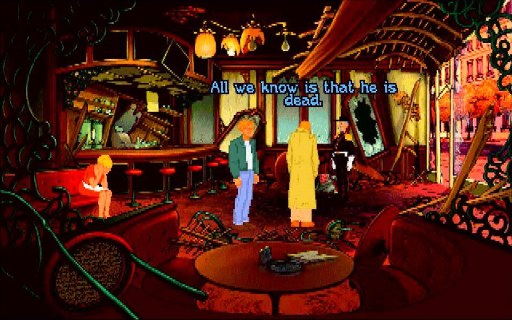
Screenshots
Overview
Broken Sword: The Shadow of the Templars Recompiled is a PSXRecomp build kit that turns Broken Sword: The Shadow of the Templars into a native Windows, Linux or macOS program. Instead of emulating the PlayStation, it translates the game’s code into C and compiles it: the download holds only the recompiler, the recomp-ui launcher and a setup wizard, and the wizard does the translating and compiling from your own disc on first run, which takes several minutes.
Its options include rendering above the original resolution, PGXP geometry correction, image filtering, a CRT filter and faster loading, with save states, rewind and input replays in the launcher. Version 0.1.0 passed the author’s automatic build and package checks for all four platforms, and on Windows a test build replayed 3 of 3 recorded routes to the end without crashing. Nobody has yet run setup or played the game from the released packages, so it is an early release.
The author says AI writes most of the code, with recorded tests deciding which changes are kept. The download contains no game data or BIOS. It needs Broken Sword: The Shadow of the Templars (Europe, SCES-00346) dumped from your own disc, and a European SCPH-5552 BIOS dumped from your own console.
How to Set It Up
- Download the zip for your system: Windows x64, Linux x64, or macOS for Apple Silicon or Intel.
- On Windows the setup wizard downloads the build tools it needs; on Linux and macOS install CMake, Ninja, Python 3 and a C/C++ compiler first, and on macOS also Homebrew’s openssl, freetype and harfbuzz.
- Extract the zip into a writable folder and run
broken_sword_the_shadow_of_the_templars(broken_sword_the_shadow_of_the_templars.exeon Windows). - In the setup wizard select your CUE file (keep its BIN files beside it) or CHD and your BIOS dump, then choose Generate & rebuild.
- The first run compiles the game and takes several minutes; later launches start it directly.
Advertisement
Download Broken Sword: The Shadow of the Templars Recompiled
What's new in v0.1.0
First release of Broken Sword: The Shadow of the Templars, built on psxrecomp pin I 0.1.23 (578bd3b, recomp-ui 5302f1f) with the shared launcher and in-game menu.
Features
These come with the shared launcher and in-game menu on pin I 0.1.23.
Replays: Press F12 to start recording during play, then F12 again to stop and save in an available replay slot. Recording needs at least one free replay slot; if every slot is occupied, the game shows “No free replay slots”. Open the save states menu with F7, then press Tab to switch between Save States and Replays. Select a recording and press Enter to play it, F2 to rename it, Delete to remove it or E to export it.
Replays record your inputs rather than video, so you can share them as lightweight files with someone using the same version of the game. Compatibility with different versions is not guaranteed. Differences in the game build, disc, BIOS or replay settings can affect playback. Press a gameplay control to stop a replay and take control at that point. When a replay finishes, the game continues from its recorded endpoint under your control.
You can record during play or from boot. To record from boot, tick “Record replay” in the GUI launcher before starting the game. F12 stops and saves this recording too. F12 and F7 are the default shortcuts and can be rebound; F11 toggles fullscreen. To keep replay timing repeatable, both recording and playback use interpreter mode instead of native compiled execution. This can reduce performance, especially on weaker systems. Recording currently supports a single Player 1 pad. PS1 Mouse, neGcon, GunCon, multitap and netplay recording are not supported.
Keyboard profiles: Save named keyboard profiles and reuse them across sessions. Use Save as, Load, Rename and Delete to manage your profiles. The Default profile stays protected.
Dual key bindings: Assign up to two keyboard keys to each action. Right-click a binding to clear it. Duplicate assignments stay visible and are highlighted so you can resolve conflicts.
PS1 Mouse, neGcon and GunCon: These controller types can be selected for games that support them. Whether Broken Sword: The Shadow of the Templars uses one of them was not tested.
Launcher: Each configured player gets a separate controls tab. The launcher remembers downloaded cover art and lets you choose a replay as a startup option.
Portable paths: Portable packages can retain local disc, BIOS and save paths when you move the game folder. Move the whole installation, including its configured local files.
In-game menu: Restart game (a cold boot of the disc), the look rows (renderer and picture options), window size, volume, controller 1 port and disc reinsert.
Movies: Movies are shown uncropped by default. Setting: Display, “Crop movies to the picture”.
GPU drawing time: Settings > Advanced, off by default. It times the GPU’s drawing as the PlayStation does; only a few games need it.
What you need. Your own disc of the game and your own PlayStation BIOS. The package contains no game data. It also contains OpenBIOS, a free replacement BIOS; setup still asks for your own.
What to do. Download the zip for your system, unpack it and run setup. It asks for the disc and BIOS, then builds and starts the game.
Tested. Packages for Windows x64, Linux x64, macOS Apple Silicon and macOS Intel. All four passed the CI build and the release package gate (archive audit and native generator start); on macOS the gate’s rule against Homebrew libraries was waived (see Known issues). On Windows, a build of this title on pin I 0.1.23 played every recorded route of Broken Sword: The Shadow of the Templars to its end, without a crash. That check compares memory, not the picture, and is not a play test. No setup run and no play test was made from these exact packages. Report any problem in the issues. This release does not claim gameplay quality.
…
1d3f0ba5fea7148bf79f0f404fcac5285db745b4f2acd85b3d3d399b944ad8ec
2967de7e7f775ab9efc4b7a10a4b2f905f3484cfe93db8066c942389d6e999c6
323aa59ad6167fc6b864b921808866373ad4df0cd8d52316d98aa6fc581c7f9c
ddf45d9aeca3359f97b7c5a2c40ce38e17a4e4834933af490419649e19c1f534
3ae448ba5e09f7cddffad147a037254e35f495c843f40e3076f47d2ad749af5b