
Alone in the Dark: The New Nightmare Recompiled
PC port of Alone in the Dark: The New Nightmare
- RecompilationPort Type
- AlexbeavDeveloper
- 16 Nov 2026Page Updated
Details
- Developer
- Alexbeav
- Port Type
- RecompilationA tool translated the game's original machine code into C automatically, which was then built as a native PC program.
- AI Use
- Mostly AI-builtThe project says: “AI writes most of the code, but I always test it myself before pushing.” Source
- Logo
- AI-made fan art, not the official logo · Full sizeEmulationKing made it because the project has no logo of its own. Free to use, no credit needed; the game's name belongs to its owner.
- Source Code
- GitHub
- Page Updated
Platform Support
Screenshots
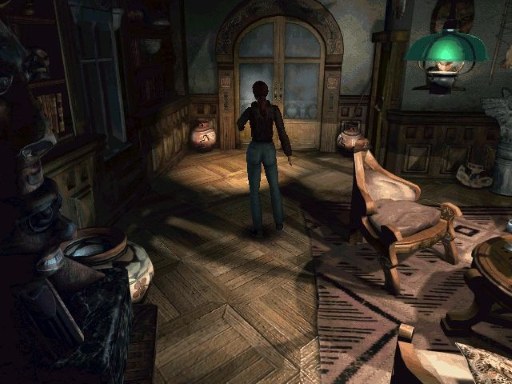
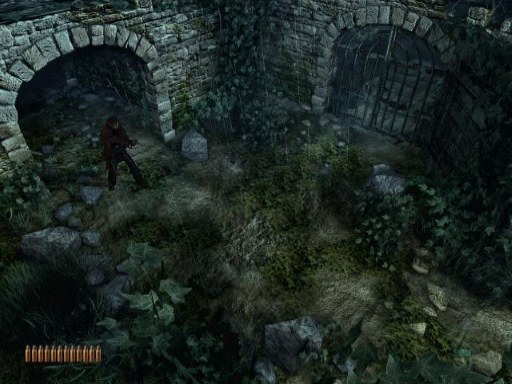
Overview
Alone in the Dark: The New Nightmare Recompiled is a native version of Alone in the Dark: The New Nightmare for Windows, Linux and macOS, made by static recompilation with PSXRecomp. It is a build kit: the download holds the recompiler, the recomp-ui launcher and a setup wizard, but no playable game. On first run the wizard reads your disc, generates C code from the game and compiles it on your computer, which takes several minutes.
The launcher offers a higher internal resolution, PGXP geometry correction, texture filtering, a CRT filter, faster loading, save states, rewind and input replays. Version 0.3.8 passed the author’s automatic build and package checks for all four platforms, and on Windows a test build replayed its one recorded route to the end without crashing. It has not been played through and Linux and macOS setup are unverified, so it is an early release. Both discs start on their own, but changing discs during play has not yet been tested by hand.
The author says AI writes most of the code, with recorded tests deciding which changes are kept. The download contains no game data or BIOS. It needs Alone in the Dark: The New Nightmare (Europe, SLES-02801, SLES-12801), all two discs, dumped from your own discs, and a European SCPH-5552 BIOS dumped from your own console.
How to Set It Up
- Download the zip for your system: Windows x64, Linux x64, or macOS for Apple Silicon or Intel.
- On Windows the setup wizard downloads the build tools it needs; on Linux and macOS install CMake, Ninja, Python 3 and a C/C++ compiler first.
- Extract the zip into a writable folder and run
Alone_in_the_Dark__The_New_Nightmare(Alone_in_the_Dark__The_New_Nightmare.exeon Windows). - In the setup wizard select your CUE file (keep its BIN files beside it) or CHD, for every disc, and your BIOS dump, then choose Generate & rebuild.
- The first run compiles the game and takes several minutes; later launches start it directly.
Advertisement
Download Alone in the Dark: The New Nightmare Recompiled
What's new in v0.3.8Alone in the Dark: The New Nightmare v0.3.8
Alone in the Dark: The New Nightmare 0.3.8 moves from psxrecomp pin I 0.1.19 (v0.3.7) to pin I 0.1.23 (psxrecomp 578bd3b, recomp-ui 5302f1f). Nothing else changes in this title’s repository.
New features
These came with 0.3.7 and are part of 0.3.8. If you are updating from an earlier version, they are new to you.
Replays: Replay recording is now supported in Alone in the Dark: The New Nightmare. Press F12 to start recording during play, then F12 again to stop and save in an available replay slot.
Recording needs at least one free replay slot. If every slot is occupied, the game shows “No free replay slots”. Open the save states menu with F7, then press Tab to switch between Save States and Replays. Select a recording and press Enter to play it, F2 to rename it, Delete to remove it or E to export it.
Replays record your inputs rather than video, so you can share them as lightweight files with someone using the same version of the game. Compatibility with different versions is not guaranteed. Differences in the game build, disc, BIOS or replay settings can affect playback.
Press a gameplay control to stop a replay and take control at that point. When a replay finishes, the game continues from its recorded endpoint under your control.
You can record during play or from boot. To record from boot, tick “Record replay” in the GUI launcher before starting the game. F12 stops and saves this recording too. F12 and F7 are the default shortcuts and can be rebound; F11 toggles fullscreen.
To keep replay timing repeatable, both recording and playback use interpreter mode instead of native compiled execution. This can reduce performance, especially on weaker systems.
Recording currently supports a single Player 1 pad. PS1 Mouse, neGcon, GunCon, multitap and netplay recording are not supported.
Keyboard profiles: Save named keyboard profiles and reuse them across sessions. Use Save as, Load, Rename and Delete to manage your profiles. The Default profile stays protected.
Dual key bindings: Assign up to two keyboard keys to each action. Right-click a binding to clear it. Duplicate assignments stay visible and are highlighted so you can resolve conflicts.
PS1 Mouse, neGcon and GunCon: These controller types can be selected for games that support them. Whether Alone in the Dark: The New Nightmare uses one of them was not tested.
Launcher improvements: Each configured player gets a separate controls tab. The launcher remembers downloaded cover art and lets you choose a replay as a startup option.
Portable paths: Portable packages can retain local disc, BIOS and save paths when you move the game folder. Move the whole installation, including its configured local files.
CHD disc images: Setup accepts CHD, a compressed disc-image format, in the file picker for supported discs.
Movies fill the picture: A 24-bit movie frame is shown at its own height, so the black bars above and below a movie are gone. Setting: Display, “Crop movies to the picture”. From 0.3.8 it is off by default (see Changes).
Save-state compatibility: Make an in-game save before updating, and keep a backup of your old installation and memory cards. Save states from older builds can be incompatible with this update.
Changes
- OpenGL renderer above 1x render scale: a column drawn as one triangle with a one-pixel short side is now filled whole, as the PlayStation does; before, thin vertical stripes could show. Native (1x) output does not change.
- Movies shown in 24-bit colour stay 24-bit when the game moves them inside video memory; before, they could flicker.
- Two of the game’s graphics transfers (DMA) are handled as the PlayStation does; before, some menus could be drawn over the previous frames.
- OpenGL renderer: more exact triangle edges and one-pixel strips, closer to the software renderer.
- Interlaced (480i) screens: the field on display is no longer drawn over.
…
bd263e51c914c4794c585f6844cecd724b6448bf34316c33f1550de98b7d5026
667a7598c7091c201bf2f601ae9eb5417ee13903061505caacd874627f2ea7b9
fce9231b8547eeb6a4bb1d138d5ce2ee8dc67913a97430e738312a3b17c901ad
cc9cfa5f6a6a4ba569e3a98ae07b19819f5799800ef48fe81c2fa2302aa612f5
d749fe36ebe6f97ceb76faab64933c576fcc551096e2fb36c4b8988f9a1d9f5a