Voldorium
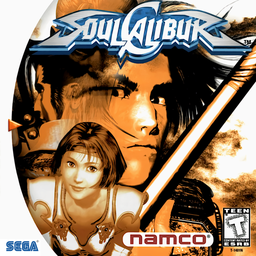
PC port of SoulCalibur
- RecompilationPort Type
- enrique363Developer
- 12 Nov 2026Page Updated
Details
- Developer
- enrique363
- Port Type
- RecompilationA tool translated the game's original machine code into C automatically, which was then built as a native PC program.
- Game
- SoulCalibur
- AI Use
- AI-assistedAn AI coding tool is credited as co-author on 50 of the repository's 50 commits. Source
- Source Code
- GitHub
- Page Updated
Platform Support
- Windows
- Linux
Screenshots
.gdi dump you made from your own disc. Windows 10 or 11, or 64-bit Linux with glibc 2.28 or newer, SDL2, OpenGL and Python 3. About 1 GB of free space and an internet connection for the first start.Overview
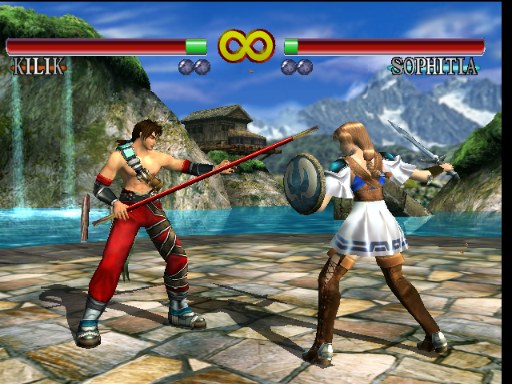
Voldorium is a native port of the Dreamcast version of SoulCalibur to Windows and Linux, made by static recompilation: the game’s SH-4 machine code is translated into C and compiled together with a small runtime that stands in for the Dreamcast hardware, with an OpenGL renderer, sound, a virtual memory card and a replacement BIOS. The download is the runtime alone, about 2 MB. On its first start it builds the game module on the player’s own PC from their own disc dump, so no game code is ever distributed.
It adds 16:9 widescreen with the HUD, menus and text kept at their true proportions, any resolution, full screen at the desktop’s resolution, multisample anti-aliasing, an in-game GRAPHICS menu, optional 16:9 replacement artwork and new high resolution hit labels in Practice.
Online Versus sits in the game’s own main menu: a worldwide lobby with matchmaking, ping and accept or decline, NAT hole punching with a relay as a fallback, and GGPO rollback netcode. Players on the same version can meet whether they’re on Windows or Linux, and the game says on its menu when a newer version is out.
How to Set It Up
- Download the zip for Windows or the
.tar.gzfor Linux and unpack it anywhere you can write to (notProgram Files). - Start
Voldorium.exe(on Linux,voldorium) and choose your.gdifile when it asks. - The first start says what it will download (a compiler and two small Flycast files, each checked against its SHA-256, all kept in the
builderfolder), then builds the game module from your disc. Later starts go straight to the game. - To move to a new version, keep
voldorium.iniandvmu_a1.bin, your settings and memory card. The new version rebuilds the game module on its first start.
Advertisement
Download Voldorium
What's new in v1.1.7Voldorium 1.1.7
The update notice is easier to spot.
Changed
- UPDATE TO is green (the main menu’s green, as on ONLINE VERSUS), and it is now also in the ONLINE VERSUS lobby, below the players, besides GRAPHICS > MORE SETTINGS. Selecting it opens the release page in your browser.
On 1.1.6 the game already says that this version is out: the corner reads ver. 1.1.6 (1.1.7 is out) and GRAPHICS > MORE SETTINGS has UPDATE TO 1.1.7. Players of 1.1.5 and earlier see UPDATE NOW at the top of their Online Versus player list.
Install
You need your own disc dump of SoulCalibur (USA, T-1401N, V1.000) as a .gdi with its track files. Neither download holds any game code: the first start builds the game module from your disc, after saying what it downloads and asking.
Windows 10 / 11: download Voldorium-1.1.7-windows.zip, unzip it anywhere you can write to, start Voldorium.exe and choose your .gdi.
Linux (64-bit, glibc 2.28 or newer, SDL2, OpenGL, Python 3): download Voldorium-1.1.7-linux.tar.gz, unpack it, start voldorium and choose your .gdi.
Updating: keep voldorium.ini and vmu_a1.bin (your settings and memory card). The first start after the update rebuilds the game module with the tools already there. Players meet online only with the same version.
Windows Defender says Trojan?
Defender may quarantine Voldorium.exe as a Trojan (“executes commands from an attacker”). This is a known false positive: each new version is an unsigned program Microsoft hasn’t seen yet, and its first start runs a script that downloads the compiler and builds a DLL, which Defender’s machine-learning check takes for a malware loader. If your copy comes from this page, open Windows Security > Virus & threat protection > Protection history, open the item and choose Actions > Allow on device.
Full changes: CHANGELOG.md.
SHA-256:
Voldorium-1.1.7-windows.zip:182ad2358bb125ebe194d23dbc46233771d2e02ebeb2d1d6524df62d0bf3bf7fVoldorium-1.1.7-linux.tar.gz:a8c87fbb98e00c660fbc44a2aac3096815d10a7519be8ecc3850c9cc4ff61820
182ad2358bb125ebe194d23dbc46233771d2e02ebeb2d1d6524df62d0bf3bf7f
a8c87fbb98e00c660fbc44a2aac3096815d10a7519be8ecc3850c9cc4ff61820
9ba5cdda3b80f98f836ed9082ea7092df871dd6c3a03a262ed3f755f3b483b53