
Smash 4 PC
PC port of Super Smash Bros. for Wii U
- RecompilationPort Type
- josiahg2502-glitchDeveloper
- 4 Nov 2026Page Updated
Details
- Developer
- josiahg2502-glitch
- Port Type
- RecompilationA tool translated the game's original machine code into C automatically, which was then built as a native PC program.
- AI Use
- AI-assistedAn AI coding tool is credited as co-author on 6 of the repository's 6 commits. Source
- Logo
- AI-made fan logo, free to use · Full size
- Source Code
- GitHub
- Page Updated
Platform Support
- Windows
Screenshots
Overview
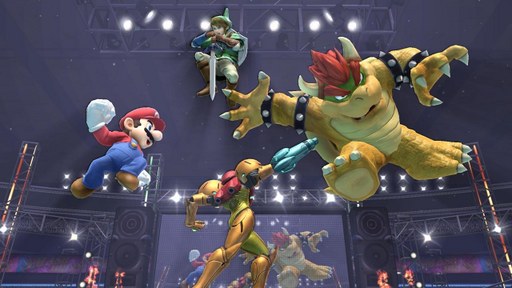
Smash 4 PC is a native Windows port of Super Smash Bros. for Wii U. The game’s PowerPC code is statically recompiled to C++ ahead of time and runs as x86-64 code on a reimplementation of the Wii U’s system libraries, with its graphics commands and shaders translated to Vulkan, so no emulator is involved.
It plays from the game’s update (v304, with every fighter and stage) or its original v1.0, with DLC from the player’s own dump, covering Smash, 8-Player Smash and the game’s other modes. The picture can be drawn at up to 4K and 5K rather than upscaled, and frame rates of 120 or uncapped are reached by interpolating between the game’s own 60 frames.
XInput, PlayStation, Switch Pro and other SDL controllers work alongside the keyboard: the first pad is the GamePad and the rest are Pro Controllers, so 8-Player Smash works locally. Smash’s own online modes work on the Pretendo Network, and content mods such as Sm4shExplorer packs, SDCafiine mods and Cemu graphic packs can be installed and switched in the launcher. No game files are included, and the project is not affiliated with Nintendo, Bandai Namco or Sora Ltd.
How to Set It Up
- Download the zip and unzip it anywhere.
- Run
Smash 4 PC.exeand choose PLAY. - Choose your game folder (
0005000010144F00), then the update (0005000E10144F00) and the DLC (0005000C10144F00) if you have them. - Play. Each shader compiles the first time it is seen and loads from the cache after that.
Advertisement
Download Smash 4 PC
What's new in v0.1.2Smash 4 PC v0.1.2: no more slowdown in long sessions
A native Windows port of Super Smash Bros. for Wii U, statically recompiled from the game’s PowerPC code. No emulator. No game data is included: you need your own dump of the game (USA) from your own Wii U.
Fixes
- The game slowed down the longer you played: every texture the game ever used stayed in memory for the whole session, which used more and more memory and made the game’s work slower over time. Textures that haven’t been drawn for about 10 seconds are now released and reloaded if they come back. In a 25-minute test, the textures kept stayed under 300 instead of passing 5,000, and memory levelled off near 5.1 GB instead of climbing to 6.9 GB.
- The zip extracted wrongly on Linux (#7): files came out as one flat folder with names like
Smash4PC-v0.1.1-Windows\smash.exe. The zip now extracts into normal folders everywhere.
Install
- Download
Smash4PC-v0.1.2-Windows.zipand unzip it anywhere. Updating: copy the new folder’s contents over your old one, which keeps your save, settings and mods. - Run Smash 4 PC.exe, choose PLAY, and pick your game folder (
0005000010144F00), then the update (0005000E10144F00, recommended) and DLC (0005000C10144F00, optional): the folders Cemu uses.
Needs Windows 10 or 11 (64-bit) and a GPU with Vulkan 1.3. Netplay is unchanged, so 0.1.1 and 0.1.2 can still play together.
Found a problem? Open an issue with smash.log (beside the program) attached.
Not affiliated with or endorsed by Nintendo, Bandai Namco or Sora Ltd.
a648dc89873b77d4e2b1ef3fdad2d9569566c3e43c5fa1eb43188969c9b58eb3