Super Mario All-Stars PC Port
PC port of Super Mario All-Stars
- WrapperPort Type
- DarhkfoxDeveloper
- 6 Nov 2026Page Updated

Details
- Developer
- Darhkfox
- Port Type
- WrapperThe game's own code runs directly on the PC, with a layer that turns the console's system and graphics calls into Windows ones.
- AI Use
- Not statedThe developers haven't said whether they used AI.
- Source Code
- GitHub
- Page Updated
Platform Support
Screenshots
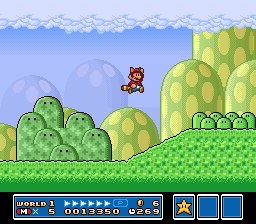
Super Mario All-Stars (USA).sfc, CRC32 925637C7), made from your own cartridge. Other versions run too, but widescreen, cheats and the level select are tuned for the USA one. Windows 10 or 11, Linux or Steam Deck (x86-64), or Android 6.0 or later on 64-bit ARM.Overview
This Super Mario All-Stars PC port is a standalone program for Windows, Linux and the Steam Deck, and Android, that plays Super Mario Bros., The Lost Levels, Super Mario Bros. 2 and Super Mario Bros. 3 from the SNES collection. It carries its own SNES hardware built in, written for this one cartridge, and changes the games themselves for features the console couldn’t do. It contains no game data and needs the player’s own All-Stars ROM.
The headline is true widescreen: the games draw a wider view than the original, with the HUDs moved to suit and the enemies of the wider view brought in. A launcher opens on one card for the collection or one for each game, with live previews, and the program adds display and filter options, cheats, a level select, achievements, a sound test and a music player, along with save states, rewind, fast forward, co-op and MSU-1 custom soundtracks. Saves are written safely so a full disk can’t damage them.
Controllers from Xbox, PlayStation and Switch pads to USB SNES pads work, as do keyboards, and on Android there are on-screen controls that hide while a controller is in use. The program checks once a day for a newer release and can be told not to.
How to Set It Up
- Download the build for your system. On Windows, unpack the zip to a folder of its own; on Linux and Steam Deck, allow the AppImage to run as a program; on Android, install the APK.
- Put the ROM next to the program or in a
romsfolder beside it. On Android, tap the launcher’s card and pick the ROM, and it is copied into the app. - Start the program and choose Super Mario All-Stars on the launcher, or switch the launcher to one card per game under Options.
- Esc, or Back on Android, opens the menu with the display, cheats, level select and control options.
Advertisement
Download Super Mario All-Stars PC Port
What's new in v1.1.1Super Mario All-Stars PC, Steam Deck & Android Edition V1.1.1
Super Mario All-Stars, rebuilt for today: a native port for Windows, Steam Deck / Linux and Android of Super Mario Bros., The Lost Levels, Super Mario Bros. 2 and Super Mario Bros. 3.
No game data is included. You need your own Super Mario All-Stars (USA) ROM (CRC32 925637C7), dumped from your own cartridge. Please don’t ask for ROMs. This is a free fan project, not affiliated with or endorsed by Nintendo.
What’s new in 1.1.1
- Update notifications: the launcher now tells you when a newer version is out. Once a day it looks up the latest release here on GitHub and shows an “Update available” badge. Select it, or use Options › Updates › Get Version, to open the download page. Nothing about you or your games is sent, nothing is downloaded or installed by itself, and you can turn it off or use Check Now under Options › Updates. (On Android the app now asks for internet access, for this check only.)
- Music Volume and Sound Effects Volume (Options › Audio): turn the music off and keep the sound effects, or the other way round. Works with music packs too. (This was added to 1.1 shortly after release, so some 1.1 downloads don’t have it.)
For everything new in 1.1 (custom soundtracks, game covers, menu styles, the Steam Deck version and more), see the 1.1 release.
Downloads
- Windows:
SuperMarioAllStars-PC-v1.1.1.zip. Unzip it anywhere and runSuperMarioAllStars.exe. Updating? Copy yoursavesfolder,smas_port.iniandachievements.iniover from your old folder (andmsu/coversif you use them). - Steam Deck / Linux:
SuperMarioAllStars-Linux-x86_64.AppImage. Replace your old AppImage with it; your saves and settings in~/.local/share/SuperMarioAllStarsstay as they are. - Android:
SuperMarioAllStars-Android-v1.1.1.apk. Install it over your current version; your saves stay. This APK is debug-signed.
Found a bug? Please open an issue with as much detail as you can (what you did, which game and level, your settings, and a save state if possible).
Licences
- The port’s own code is MIT.
- librashader: MPL-2.0.
- The slang shader presets: GPL-2.0 or public domain, as listed in
shaders/README.txt. - Luckiest Guy font: Apache-2.0.
- stb_image: public domain / MIT.
Team RedTail: Patreon · YouTube · X
774a0fa08d0c697e83ed09b3e563a707edc1feb9f3a085a492216a87bd4d8445
e4dd33890bd7e2978532bccf3da7128aed2efe7a1cc66d3db62a2686d4620b8f
3376b83ffbb0c54922204eec286d74ca301e576bb2a6dd1ffd4156fbb834b1a8
f1727c96cb06a85735a8a38ae3b3ed1931941e38546294b9a561923c73651287