
Bright Dawn
PC port of Golden Sun: Dark Dawn
- RecompilationPort Type
- BoneyKKDeveloper
- 25 Nov 2026Page Updated
Details
- Developer
- BoneyKK
- Port Type
- RecompilationA tool translated the game's original machine code into C automatically, which was then built as a native PC program.
- AI Use
- AI-assistedAn AI coding tool is credited as co-author on 146 of the repository's 148 commits. Source
- Logo
- AI-made fan logo, free to use · Full size
- Source Code
- GitHub
- Page Updated
Platform Support
- Windows
- Linux
Screenshots
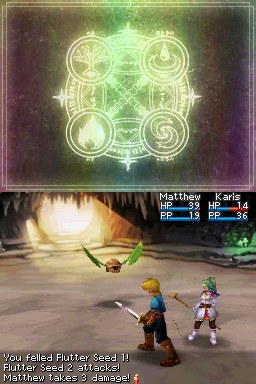
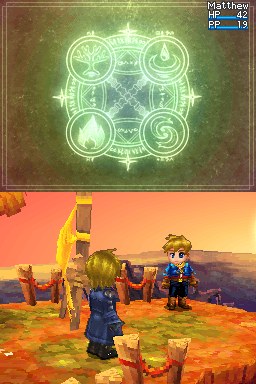
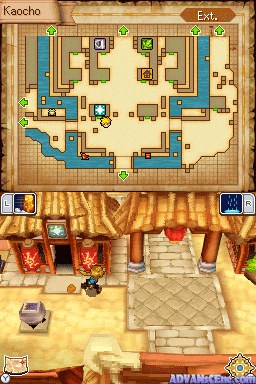
Overview
Bright Dawn is an unofficial native PC version of Golden Sun: Dark Dawn, Camelot’s 2010 role-playing game for the Nintendo DS, for Windows and Linux. The game’s own code, read from the player’s ROM, is translated to C++ by static recompilation and compiled for the computer, with an interpreter behind it for anything not yet translated. Everything it takes from the game, from the code to the launcher’s pictures and font, is read from the player’s own ROM on their own computer.
The aim is one unified screen, high-resolution and widescreen rendering, controller-first input and, later, packs for textures, models and music. Widescreen already fills battles and the field, 3D textures can be smoothed, and the left stick walks at any pace.
It is an early pre-release, playable through the opening hours: Saha Town, the first cave, battles and saving have been tried, music and sound play and saves are kept, but later parts of the game are untested. New pre-releases arrive often.
How to Set It Up
- Download the Windows zip or the Linux archive and extract it.
- Start the launcher and give it your Golden Sun: Dark Dawn ROM.
- Let it build the game from your ROM, then play. Each release’s notes list the controls and what changed.
Advertisement
Download Bright Dawn
What's new in v0.1.0-pre.202Bright Dawn v0.1.0-pre.202
Watch out
Playable through the early game. The game starts from a ROM you supply yourself and can be played from its opening through the early game: Saha Town, the first cave, battles and saving in the game have been tried. Later parts have not been tried yet. Music and sound effects play. The game’s save is kept between runs. Built from your ROM, the game runs about twice as fast as interpreted. Expect bugs and crashes: please report them with the log (see the end of this page).
Changes since v0.1.0-pre.200
- With Widescreen (3D) on, models at the sides of the field are drawn instead of popping in late.
- “Textures in 3D scenes: Smooth” now smooths 3D textures with the graphics hardware renderer too.
Download and start
Automated pre-release, built from main after all checks passed. No ROM and
no game data are included.
bright-dawn-windows-x86_64.zip: Windows, 64-bitbright-dawn-linux-x86_64.tar.gz: Linux, 64-bit (needs X11 or Wayland)SHA256SUMS.txt: checksums of the packages
Unpack and start bright-dawn. The first time (and after each update) it
opens the setup: choose your ROM (it is remembered) and build the game from
it, its code translated to C++ and compiled on your computer, which the
program then runs natively. Then the launcher opens: play, the settings, and
the log, in the look of the game’s own settings menu and font, read from your
ROM. It draws through Vulkan, or the system’s own renderer where Vulkan is
not there. Nothing needs installing for that: the compiler
(and on Windows, Python, if it is not installed) is downloaded for the build,
checked, and deleted with everything else the build made; about 2 GB of free
space is needed while it runs. The built game gets as far as the
interpreted one (the name entry) and runs about twice as fast.
Keyboard: arrow keys, X = A, Z = B, S = X, A = Y, Q = L, W = R, Enter = Start, Right Shift = Select. The left mouse button on the touch screen is the stylus. Controllers work by button position, as on the DS. Escape (or a controller’s guide button): the menu, with the settings. F11 or Alt+Enter: full screen. Tab: screens side by side or stacked. F12: whole-number scaling or filling the window.
The game’s save is kept in saves in the user data folder (below), with a
copy of it as it was before the last run that changed it (.sav.backup).
Reporting a problem
Report a problem, on the launcher’s Log page or in the pause menu
(Escape), opens the project’s form for a report on GitHub with the version,
system, renderer, game code and built game or interpreter filled in, and the
folder of the logs. Every run writes a log, in logs in the user data folder
(%LOCALAPPDATA%\BrightDawn on Windows, ~/.local/share/bright-dawn on
Linux): please attach it. Never attach the ROM, saves or other game files.
142033b43bfd23f0bee65266b638f56b14350b9b39a51e2cb7fd1dc5f5c3342c
8b81b9abd7924ab836e4bf4222bfc4314c5b3ebbc328e7207aa2206bf78692b7