Rally Builder
PC port of Top Gear Rally
- DecompilationPort Type
- Jeffrey Wilbur (Strut B)Developer
- 4 Nov 2026Page Updated
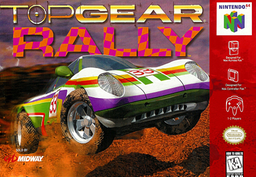
Details
- Developer
- Jeffrey Wilbur (Strut B)
- Port Type
- DecompilationThe game's code was rewritten by hand as source code that builds back into the same game, then made to run natively on PC.
- Game
- Top Gear Rally
- AI Use
- Not statedThe developers haven't said whether they used AI.
- Source Code
- GitHub
- Page Updated
Platform Support
- Windows
- macOS
Screenshots
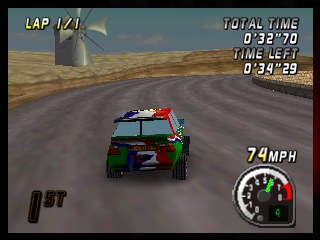
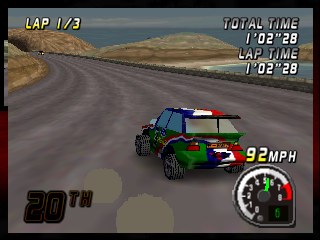
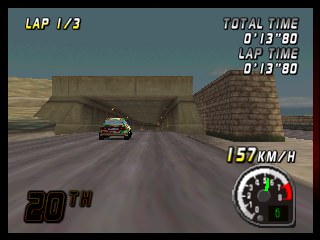
Overview
Rally Builder is the player’s way into a preservation project by Jeffrey Wilbur (Strut B) that decompiles Boss Game Studios’ rally games: Top Gear Rally for the N64 (1997) and Boss Rally for Windows (1999), which was built on the same engine. The Top Gear Rally decompilation is byte-exact: every one of its 572 functions compiles under the original SGI compiler to the bytes of the retail ROM, for all three cartridges. Boss Rally’s decompilation is held to the same standard against the original Microsoft compiler and is still in progress.
The builder carries the games’ code compiled for Windows or the Mac, without any of their data. It reads the player’s own ROM or CD, checks it by MD5, and writes a game that runs natively with no emulator. Boss Rally and Top Gear Rally are faithful ports that play like the originals, with full screen, keyboard and gamepad controls and the console’s own frame rate per region added.
Top Gear Rally Remastered combines both: Top Gear Rally’s menus and seasons with Boss Rally’s engine running the races at 60 ticks a second, plus widescreen, a choice of PC or N64 music, an FPS counter, two-player split screen and controller rumble. On a Mac it can also be built for iPhone and iPad. A Linux build is not available yet.
How to Set It Up
- Download Rally Builder for Windows or macOS and extract it.
- Open Rally Builder and pick a game: Boss Rally, Top Gear Rally or Top Gear Rally Remastered.
- Point it at your ROM or BIN/CUE. It checks each file’s MD5 against the known dumps before building.
- Pick a folder and press build. The result plays on its own; your original files are no longer needed. Alt+Enter (Windows) or Control-Command-F (Mac) switches to full screen.
Advertisement
Download Rally Builder
What's new in v0.98Rally Builder 0.98
Rally Builder makes a native build of a game from your own copy of it. Pick one of three:
- Boss Rally (PC, 1999), from your retail CD, with its CD soundtrack.
- Top Gear Rally (Nintendo 64, 1997), from your cartridge ROM: the USA’s, Europe’s or Japan’s. The build is that cartridge’s game.
- Top Gear Rally Remastered, from the USA and Japan ROMs and the CD: Top Gear Rally’s menus, seasons and soundtrack, with every race run by Boss Rally’s engine on the same tracks.
On a Mac, Boss Rally and Top Gear Rally build for the Mac, and Remastered for the Mac or for the iPhone and iPad; on Windows, each builds for Windows. The games’ data is copyrighted, so the builder does not include it: you provide your dumps, the builder checks them by MD5 (a dump that does not match can still be built after a warning), takes what the game needs from them, and produces a game that runs on its own. The dumps are not needed once the build is done.
The games are the decompilations’ own code, compiled natively: Top Gear Rally’s is byte-exact to each of its three cartridges, every function, and Boss Rally’s behaves exactly as the retail game does, every function, most of them byte-exact too. The version follows that byte-exact (M2) progress, the average over the three cartridges and Boss Rally:
Boss Rally               M2  78.58%  (354110 / 450649 B)
Top Gear Rally (USA)     M2 100.00%  (379932 / 379932 B)
Top Gear Rally (Europe)  M2 100.00%  (385308 / 385308 B)
Top Gear Rally (Japan)   M2 100.00%  (383948 / 383948 B)
In this release
- Remastered, one car, two versions: Japan’s cartridge replaced three cars with its own (Type-RS with Type-PJ, Type-M3 with Type-TR, the Helmet with Type-MN). Each pair is now one car on the car select: left and right step through the cars, and up and down switch the car between the USA’s version and Japan’s, whichever menus you are in. A line under the car’s name says what up or down brings and names your own keys (on the iPhone, swipe up or down); in two-player each player switches their own. The version you last chose stays for the next pair. Boss Rally’s own menus do the same on Car Setup: a new Version row under Car says USA or Japan and switches it, and Car steps each pair as one car.
Earlier, in 0.97, 0.96, 0.95 and 0.94
- Remastered, the games’ boxes: the Music and Menus choices show the box of the game they pick instead of a monitor or a console: Top Gear Rally’s USA box, its Japanese box for PAL/Japan, or Boss Rally’s. On Top Gear Rally’s options screen each is a 3D box in its art’s own proportions, turning on the ring as the other icons do, and when you change the choice it spins round to the next box. Boss Rally’s Remaster Options page shows a picture of the same box.
- Remastered, Menus waits for you: choosing other menus on the options screen no longer switches the moment you press. The Menus row shows your choice and the other menus take over when you leave the options screen, on their main menu. Boss Rally’s Remaster Options page works the same way: Menus there says which menus you have chosen, and Back takes you to them.
- Remastered, button prompts in the cartridge’s style: the A and B prompts at the foot of the menus and on the popups are drawn as Top Gear Rally’s own round N64 buttons, A blue and B green and lit from the upper left as the cartridge’s pictures are, instead of square key caps. Each still names your own key or pad button; a longer name (ENTER, ESC) gets a longer button with round ends.
…
0ade115aa8a368cfb39da5af4c244319d97eeaf38867fad7666a54a8870ae0ac
232ff5b0c065a5a5e44dba1935b9539958ec616649efddfe0ecb215bb620e636
You may also like


