Killer Instinct Gold: Recompiled
PC port of Killer Instinct Gold
- RecompilationPort Type
- geno55Developer
- 14 Nov 2026Page Updated
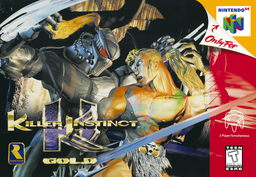
Details
Platform Support
- Windows
Screenshots
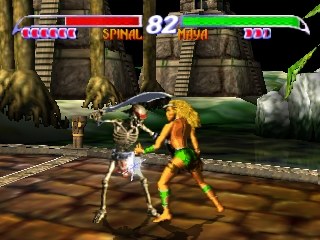
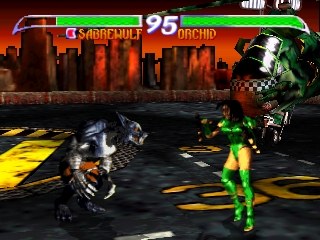
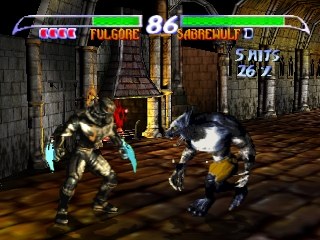
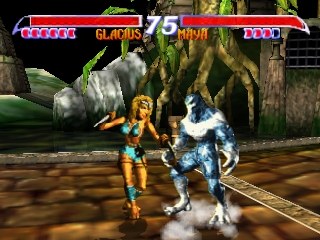
.z64, .v64 or .n64 file with the SHA-1 aaeb492b1e538af65a3544a97240675ef438a04f. Windows (64-bit) with a graphics card that runs RT64; Linux players build it themselves from the source.Overview
Killer Instinct Gold: Recompiled is an unofficial native Windows port of Killer Instinct Gold, Rare’s 1996 Nintendo 64 version of its arcade fighting game. It was made with N64: Recompiled, which translates the game’s machine code into C, and draws through the RT64 renderer. The download contains no part of the game: it asks for a ROM dumped from the player’s own cartridge the first time it runs.
The intro, title screen, character select, full fights with graphics, sound and controller input, and the Continue screen all work. Saving, every character and stage, and a side-by-side check against real hardware are still to be done. One quick-save slot (F5 and F7) is there for testing and reporting bugs, and a state may not load in another version.
Only the US Rev 2 (v1.2) cartridge is supported. The release is Windows only, and the project includes a guide for building a native Linux version from its source.
How to Set It Up
- Download the Windows zip and extract it.
- Run
kig.exeand pick your game file when it asks, or drag the file ontokig.exe. - Settings and saves are kept in
%APPDATA%\KIGRecomp. F5 saves a state and F7 loads it.
Advertisement
Download Killer Instinct Gold: Recompiled
What's new in v0.3.3
You need your own copy of the game. No ROM is included. It needs the USA Rev 2 (v1.2) ROM; the hash is in the readme below.
What’s new in v0.3.3
- Projectiles look as on the N64 (#13). Fireballs and similar effects (Jago’s, Orchid’s, Fulgore’s, Maya’s and others) were drawn as flat, saturated blobs. The game draws them with a colour conversion on the N64’s graphics chip that the renderer didn’t emulate. They now have their proper white cores and trails.
- The sky on Jago’s stage (also used for Training) is no longer black (#14). It now shows its cloudy dark-to-brown gradient. The other stages’ skies that were checked already matched the original.
- Widescreen (Expand): the select and versus screen fighters are no longer cut off. A fighter sliding in from the side was cut off at the edge of the 4:3 area.
Known limitations
- Not every character and stage has been checked, and some details still differ from the original game.
- High frame rate isn’t supported yet.
- Save states (F5/F7) are for testing, and a state may not load in another version.
- This download is Windows only. Linux support is experimental and is built from source: see the Linux build guide.
Please report problems on GitHub, and attach the log or crash report.
Killer Instinct Gold: Recompiled v0.3.3
A native Windows port of Killer Instinct Gold (N64), made by static recompilation with N64Recomp, N64ModernRuntime and RT64. Unofficial fan project.
NO ROM IS INCLUDED. You need your own copy of the game: a ROM of the USA Rev 2 (v1.2) release (sha1 aaeb492b1e538af65a3544a97240675ef438a04f as .z64; .v64 and .n64 dumps work too).
REQUIREMENTS Windows 10 or 11 (64-bit), a GPU with Direct3D 12 or Vulkan.
FIRST RUN Run kig.exe and choose Choose ROM… in the launcher (or drag the ROM onto kig.exe, or run kig.exe path\to\your\rom.z64). The ROM is checked and copied to %APPDATA%\KIGRecomp. After that, run kig.exe and pick Start game.
SETTINGS MENU Esc, or a controller’s Back (View) button, opens the settings menu over the paused game. Settings in the launcher opens the same menu. Tabs: General, Controls, Graphics, Sound. Up/down picks a setting, left/right changes it, Enter (A) selects, Esc (B) goes back, Q/E (LB/RB) switches tabs. The mouse works too. Changes apply at once and are saved. Controls > Bindings: choose a slot, press Enter (A), then press the key or controller input to use; Del (X) clears a slot.
CONTROLS Keyboard (port 1): arrows/WASD = stick, X = A, C = B, Z/Left Shift = Z, Enter = Start, Q/E = L/R, I/J/K/L = C buttons, T/F/G/H = D-pad. Gamepads (Xbox layout) take ports 1-4 in the order they are connected. All of this can be changed in the settings menu (Controls) or in controls.json (below). Alt+Enter or F11: toggle fullscreen (remembered).
SETTINGS AND SAVES (%APPDATA%\KIGRecomp) graphics.json resolution (Original/Original2x/Auto), antialiasing (None/MSAA2X/MSAA4X/MSAA8X), window_mode (Windowed/Fullscreen), graphics_api (Auto/D3D12/Vulkan), and more general.json pak_port_1..4: which ports have a Controller Pak (all four by default), pause_when_unfocused (true/false) controls.json keyboard_port (1-4, 0 = off), deadzone (percent), pads (per port, part of a controller’s name to put on that port), and the keyboard and gamepad bindings: up to two keys or controller inputs per N64 button and stick direction, e.g. “A”: [“X”, “Space”] or “Z”: [“lefttrigger”] (controller inputs: a b x y start leftshoulder rightshoulder dpup dpdown dpleft dpright leftstick rightstick, lefttrigger righttrigger, leftx- leftx+ lefty- lefty+ rightx- rightx+ righty- righty+) sound.json master_volume (0-100), mute_when_unfocused (true/false) window.json window size and position (remembered automatically)
…
643e2f7d72a537216353d277de2927fb2f44afc1aed5a1ce2085108195e4a13a
173d5d545c72c3dbf4fef87c77115ac42f7546e472ccccd08eb0605cc9b46852