ReKHCoM
PC port of Kingdom Hearts: Chain of Memories
- DecompilationPort Type
- MatyMeatBoyDeveloper
- 30 Oct 2026Page Updated

Details
- Developer
- MatyMeatBoy
- Port Type
- DecompilationThe game's code was rewritten by hand as source code that builds back into the same game, then made to run natively on PC.
- AI Use
- AI-assistedAn AI coding tool is credited as co-author on 382 of the last 1081 commits. Source
- Source Code
- GitHub
- Play in Your Browser (Alpha)
- matymeatboy.github.io
- khcom Decompilation
- GitHub
- Page Updated
Platform Support
- Windows
Screenshots


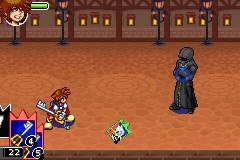
SHA-1 of a correct dump, by version:
Europe (B8CP):
8db73586cdb11b3795907edebf43228dbcd3e6b2USA (B8CE):
10729bd884f8fdca7a310b6d606c52e46657aa48Japan (B8CJ):
59ec0a0a4ccd1e6acb3bbd7bfb21d63988958cfaOverview
ReKHCoM is a PC port of Kingdom Hearts: Chain of Memories for the Game Boy Advance, built on Pheenoh’s matching decompilation of the game. The decompiled C code is compiled into a 32-bit Windows program with its own renderer, sound mixer and launcher, while the game’s graphics, sound and text are read from the player’s own cartridge dump at start-up.
Fields and battles widen to fill 16:9 and ultrawide screens up to 32:9 without stretching, and menus that stay at their original size are framed with art extended from their own edges. The game runs at the cartridge’s own speed, with optional audio smoothing, full-screen movies and an HD font for dialogue, subtitles and menus. Each new game can be the original exactly as on the cartridge or Re:Chain of Memories, which brings in ideas from the PlayStation 2 remake: Beginner, Standard and Proud difficulty, faster dialogue and a one-button dodge and card stock.
The European, US and Japanese cartridges all work, in every language they contain, and each keeps its own save. The launcher installs and checks the dump, imports Game Boy Advance saves and backs them up. A browser version is in alpha. The download includes the project’s launcher artwork but no ROM or game data.
How to Set It Up
- Download the Windows zip and extract it into a folder you can write to.
- Run
ReKHCoM.exeand choose Install ROM…, or drag your dump onto the window. It is checked and copied into theromsfolder. - Pick the version, language, graphics, sound and controls in the launcher, then press Play.
- When starting a new game, choose Original or Re:Chain of Memories. START + SELECT changes the settings later.