FFTARecomp
PC port of Final Fantasy Tactics Advance
- RecompilationPort Type
- Jorge262007Developer
- 1 Nov 2026Page Updated

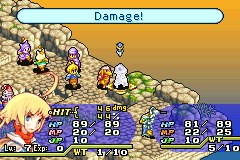
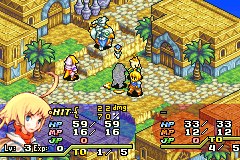
Overview
FFTARecomp makes Final Fantasy Tactics Advance for the Game Boy Advance into a native program for Windows, Linux and the Steam Deck. It is built on JRickey’s gba-recomp: its installer statically recompiles the game from the player’s own ROM and compiles the result on the spot, so the game runs without an emulator or a BIOS.
The port adds widescreen views from 16:10 to 32:9, zoom in and out, screen model, grid and scaling options, vsync, volume controls, remappable keys and XInput gamepad support. Fast forward has three sound modes: silent, sped-up audio, or audio kept at normal speed while the game hurries ahead.
Version 2.0 added the Linux and Steam Deck builds, a redesigned menu and zoom. The author calls the project a work in progress; sprite silhouettes can flash for a moment in the first battle, and a gamepad may only be recognised after remapping a button once. The Windows download includes the compiler toolchain the installer needs, which is why it is much larger than the Linux one. Neither contains any game data.
How to Set It Up
- Download the zip for Windows or the tar.gz for Linux and Steam Deck, and extract it into a folder of its own (on Steam Deck, from Desktop Mode).
- Run
Installer.exeon Windows or./FFTAInstalleron Linux, choose your ROM and press Recompile & Install. - Wait while it builds the game on your PC. This happens once and can take several minutes, then press Play.
- Press Esc in the game for the options menu: widescreen, zoom, video, audio, fast forward and controls.
Advertisement
Download FFTARecomp
What's new in v3.1FFTARecomp v3.1
🆕 What’s new
- 🕹️ Steam Deck: the port menu now opens with Y
- 📱 Much better mouse and touch support on Android. Most of the game is now playable with this mode
- 📜 Scrollbars were added so menus are more comfortable to use with the mouse and touch
- 💾 Reworked save system: the game now creates an auto save every 5 seconds, so you can close the game at any time, anywhere, without losing progress
- 💾 The slot limit of the base game was raised: you can now have more than 2 save slots
- ⏩ New x1.5 speed for fast forward
- 🖥️ Menus redesigned for widescreen, without black borders, repeating the gradient patterns of the game’s own textures. Please keep in mind that the menu background is just an image, and stretching the render area doesn’t magically extend everything in the menu. This is my best effort to widen it; a better option would be to recreate the artwork from scratch, but I don’t have much artistic experience
- 🔍 Smooth zoom: zooming in and out is now animated instead of instant, and some UI elements that didn’t scale with zoom out now do
- 💬 Visual bugs fixed related to text bubbles
- 🎞️ Visual bugs fixed related to the enter and exit animations of the menus, plus other visual fixes
📥 Installation
Windows
- Download
FFTARecomp-windows-x86_64.zipand extract it. - Run
FFTARecomp.exe, choose your Final Fantasy Tactics Advance ROM (European version) and press Recompile & Install. - Press Play.
Linux
- Download
FFTARecomp-linux-x86_64.tar.gz. - Run:
mkdir -p FFTARecomp-linux && tar -xzf FFTARecomp-linux-x86_64.tar.gz -C FFTARecomp-linux && cd FFTARecomp-linux && ./FFTAInstaller
Steam Deck
- Download
FFTARecomp-SteamDeck-linux-x86_64.tar.gz. Do this from Desktop Mode. - Extract it and run the installer inside.
Android
- Download
FFTARecomp-android-arm64.apkon your device. - Tap the downloaded file and press Install. Allow installation from unknown sources if Android asks.
📝 Notes
- ⚠️ The USA version of the game is temporarily not supported with the new changes. Your saves are compatible between regions, so there should be no problems: you only need to switch to the European ROM
- The Windows executables are not code-signed, so Windows may show a SmartScreen warning.
🔐 Verification
Windows (FFTARecomp-windows-x86_64.zip)
SHA-256: ca5c1416dabbd79de9161708fce2025dda76e4eeb0df6bd67856e565ea7be6f5
Linux (FFTARecomp-linux-x86_64.tar.gz)
SHA-256: 3ef3bd1a29729b10801ea5a21f761e80e448ddc2dfeac7370336ad09af38071e
Steam Deck (FFTARecomp-SteamDeck-linux-x86_64.tar.gz)
SHA-256: f17fb6a026917743e944e1be4bafd73e9c7f370850b3fbae64f4ba485dd214e8
Android (FFTARecomp-android-arm64.apk)
SHA-256: dc8d0403dbaa4afcecb3deaaeb09f6427c1eff29c5db6e556b1ab2aef8f1c117
ef8db66127e030506bafbdff5d86e3aeaece3b0da8f702591c2eb45756e72434
385c914402c9ea6a4c64457dc1b487ec1a7baa0b993fb415d7d3d5cab9348201