ALBW Native
PC port of The Legend of Zelda: A Link Between Worlds
- DecompilationPort Type
- spacestate1Developer
- 21 Nov 2026Page Updated
Details
- Developer
- spacestate1
- Port Type
- DecompilationThe game's code was rewritten by hand as source code that builds back into the same game, then made to run natively on PC.
- AI Use
- AI-assistedAn AI coding tool is credited as co-author on 391 of the repository's 391 commits. Source
- Logo
- AI-made fan logo, free to use · Full size
- Source Code
- GitHub
- Page Updated
Platform Support
- Windows
- Linux
Screenshots
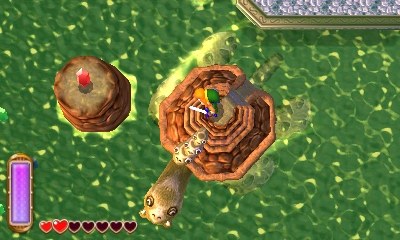
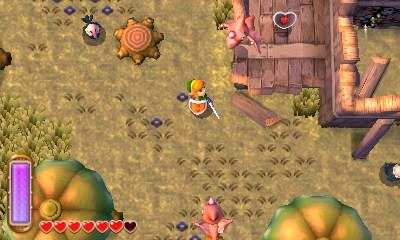
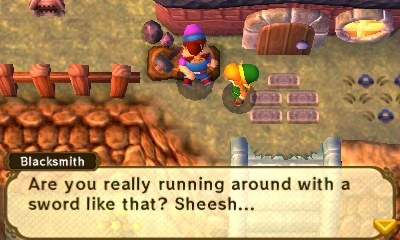
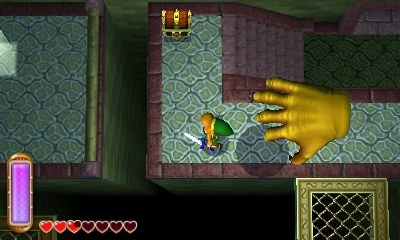
.3ds, SHA-1 4d2da91fa0edef9eef07e471527461396cc3faf2); the US and Japanese releases don’t work. 64-bit Linux (Ubuntu 22.04 or newer, Debian 12, Fedora, Arch, SteamOS and similar) with the system’s 32-bit C library and an OpenGL driver. The Windows build is experimental.Overview
ALBW Native is spacestate1’s native port of The Legend of Zelda: A Link Between Worlds, Nintendo’s 2013 Nintendo 3DS adventure, to Linux. It is built on the albw-decomp-ai decompilation by 7akeem0 and its contributors: the game’s logic runs as C code on the PC, while graphics, sound, input and files are rewritten with SDL3 and OpenGL, using hand-written shaders. There is no emulation of the 3DS’s CPU, graphics chip or operating system; its library calls are replaced one by one.
It is a work in progress and playable through large parts of the story, but bugs are expected. The Fire and Tornado Rod flame cones are not drawn, some effects and cutscenes are wrong, and most dungeons after the Eastern Palace are untested. Save states aren’t shared between the Linux and Windows builds, while in-game saves are.
The game’s data is read from the player’s own European dump when they run it, and nothing from it is in the repository or the downloads. The port’s own code is MIT licensed; the decompiled game code it is built on has no licence yet. The Windows build is experimental and hasn’t been tried on real Windows hardware.
How to Set It Up
- Download the AppImage and make it executable:
chmod +x ALBW-native-x86_64.AppImage. - Run it with your ROM:
./ALBW-native-x86_64.AppImage --rom /path/to/your/game.3ds. Without FUSE, add--appimage-extract-and-run. - On the Steam Deck, the AppImage also runs in Game Mode when added to Steam as a non-Steam game.
- The Windows zip is experimental and so far tested only under Wine.
Advertisement
Download ALBW Native
What's new in v0.2.2
Fixes:
- Crash after ringing the bell and choosing a place on the map (Irene’s arrival).
- Single-screen mode: the bell on the map page can be selected with the D-pad and A, and its warp menu works.
- Floating-point stack guard: no longer misses a full stack (that could turn values into NaN and crash later, e.g. in the Zora’s River scene).
Downloads:
- ALBW-native-x86_64.AppImage: Linux.
chmod +x, then./ALBW-native-x86_64.AppImage --rom /path/to/game.3ds. - ALBW-windows-experimental.zip: Windows (experimental, tested under Wine only). Unzip and run
ALBW.exe.
Needs your own decrypted European ROM: 0487 - Legend of Zelda, The - A Link Between Worlds (Europe) (En,Fr,De,Es,It) Decrypted.3ds (SHA-1 4d2da91fa0edef9eef07e471527461396cc3faf2).
Language: set ALBW_LANGUAGE to 1 English, 2 French, 3 German, 4 Italian, 5 Spanish.
b3f4796e4375df753e8a7184f8cc4662946f5aa059886ec2e331ba4b618f270d
db852d006c01aa10c645adaf23b94267e44009417db62e8d9a1fbe471a68c6ab
0a3bf368b4b914d30b2566986029ccb2494cf073d14929bad85210c822a24c86