RondoRecomp
PC port of Castlevania: Rondo of Blood
- RecompilationPort Type
- gminustwoDeveloper
- 14 Nov 2026Page Updated

.cue with its tracks (zipped, 7z, in a folder) or a .chd, or the Wii .wad or Wii U Virtual Console release with the console key. No BIOS is needed. Windows (64-bit), or 64-bit Linux with glibc 2.35 or newer, the Steam Deck included.Overview
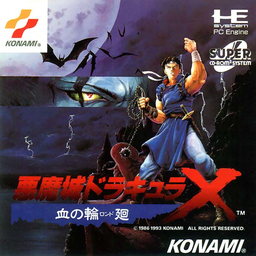
RondoRecomp is an unofficial static recompilation of Castlevania: Rondo of Blood, Konami’s 1993 PC Engine Super CD-ROM² game, into a native program for Windows, Linux and the Steam Deck. Its setup reads the player’s own disc image, translates the game’s HuC6280 code into C and compiles it with a bundled Zig compiler into rondo.exe, so the download carries no game code or data. Code that can’t be worked out ahead of time falls back to a built-in interpreter, and the System Card functions the game calls are rewritten in C, so no BIOS is needed.
It accepts the original Japanese disc, the English fan translation, and the Wii and Wii U Virtual Console releases, and the Japanese and English versions can be installed side by side and switched with a language option. On top of the game it adds rewinding of up to 30 minutes, save states, cheats, a modern controller layout with buttons for the sub-weapon, Item Crash and backflip, rebindable keys, and video modes for 4K, 16:9 and ultrawide screens with filters and screen effects.
Optional extras include Richter’s run from Symphony of the Night, Maria unlocked from the start and Super Castlevania IV style eight-way whipping. RetroAchievements work for both discs, though only in softcore until RetroAchievements recognises the port. A portable mode keeps settings, saves and states next to the game, and the start screen offers updates when a new release is out.
How to Set It Up
- Download the Windows zip and unpack all of it somewhere you can write to (not Program Files), or download the AppImage for Linux and the Steam Deck and make it executable.
- Run RondoRecomp Setup (on Linux, the AppImage). Click Disc zip… for a zipped image,
.cueor.chd, or Disc folder… for an unzipped one. - Setup checks the disc, recompiles the game’s code and builds
rondo.exein about a minute. Click Play; after that, startrondo.exeor the AppImage directly. - Run Setup again with the other disc to add the second language. On the Steam Deck, add the AppImage to Steam as a non-Steam game.
Advertisement
Download RondoRecomp
What's new in v1.2RondoRecomp 1.2
Rondo of Blood, recompiled to run natively on Windows and Linux, the Steam Deck included. The downloads contain no game code or data: you need your own copy of the disc. Either disc works: the English fan translation or the Japanese original.
Downloads
- Windows:
RondoRecomp-1.2-windows-x64.zip. Unpack all of it anywhere you can write to, then runRondoRecomp Setup.exe. - Linux and Steam Deck:
RondoRecomp-1.2-x86_64.AppImage, a single file. Make it executable and run it: Setup opens the first time, and after that the AppImage starts the game. It needs glibc 2.35 or newer: SteamOS 3, Ubuntu 22.04, Debian 12, Fedora 36, Arch, or later. - The file with
-update-in its name is for the Windows updater. To install RondoRecomp on Windows, download the plain zip.
Already on 1.0 or 1.1? The game’s start screen offers the update: open Updates and choose Download and install.
In Setup, click Disc zip… for a zipped disc image (or pick its .cue or .chd), or Disc folder… if you’ve already unzipped it. Setup checks the disc, recompiles the game and builds it in about a minute. Then click Play.
On the Steam Deck:
- In Desktop Mode, put the AppImage somewhere to keep it, such as your home folder.
- In Dolphin, right-click it, then choose Properties → Permissions → Is executable.
- Double-click it, and build the game with Setup.
- In Steam, choose Games → Add a Non-Steam Game to My Library, then Browse…, and pick the AppImage.
- Back in Gaming Mode, the game is in your library under Non-Steam.
The full steps are in README.txt.
New in 1.2
- Stages end with the cheats on. With infinite health on, a stage never ended (#6): at a stage’s end the game counts your health into the score, and the cheat kept refilling it. Health and hearts now count down there as usual, and the next stage starts with them full.
- Portable mode. Tick Portable at the bottom of Setup’s window to keep options, saves and save states in a
userfolder next to the game instead of your user profile (#5).- Setup offers to copy the ones you have into it. Untick it to copy them back.
- On Linux the
userfolder goes next to the AppImage.
.chdimages stay compressed. The game now reads a.chddirectly, so Setup no longer unpacks it: the Japanese disc takes 270 MB instead of 496 MB (#3).- To shrink an install made with 1.1, run Setup again with your
.chd.
- To shrink an install made with 1.1, run Setup again with your
- Super Castlevania IV moves. Two new options on the Gameplay page, both off by default and off in RetroAchievements hardcore mode.
- 8-way whip and doves: hold a direction as you attack. Richter whips up, diagonally up, and in the air down and diagonally down; Maria throws her doves the same way. Up + Attack no longer throws the sub-weapon then: use the Sub-weapon button.
- Limp whip: keep Attack held after a whip and it hangs from Richter’s hand. The d-pad swings it, and it still hurts what it touches.
- The idea comes from Pizzano’s Super Rondo of Blood hack. This is RondoRecomp’s own version; none of the hack is used.
5c45f990212e9e113ae988b838fe702b703fcb3b404f80c9377fb262575921e0
b19408b63f672f8cb693f8aa89196a890c814ab956770a0ff0d85941fa4a60f3
006a3a86efeff7e20231d9e2e208fca5c88fd63115e039097dffe09df45ca5a6