Project8Recomp
PC port of Tony Hawk's Project 8
- RecompilationPort Type
- theokyrDeveloper
- 30 Sep 2026Page Updated



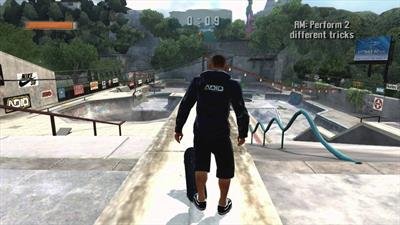


Overview
Project8Recomp is a native port of Tony Hawk’s Project 8 for Linux, macOS and Windows, made by static recompilation with ReXGlue and drawn with Vulkan. The launcher reads your disc image directly, refuses a release it does not support before copying anything, and keeps the game, saves and settings in one folder.
Linux is the main platform and runs well on the Steam Deck. The macOS build for Apple silicon works but is still too slow in busy scenes, and the Windows build is experimental: it has been tested only under Proton, not on real Windows.
The frame rate cap should stay on, since in-level cutscenes run three to five times too fast without it. The download contains no game data. It needs Tony Hawk’s Project 8 for Xbox 360, dumped from your own disc.
How to Set It Up
- Download the zip for your system and extract it somewhere you can write to.
- Run
Project8Recomp(Project8Recomp.exeon Windows). On macOS, right-click it and choose Open the first time. - Point it at your ISO. It checks the image and then copies the game data into the same folder, which takes a few minutes.
- Leave the frame rate cap on: without it, in-level cutscenes run too fast. Run
Project8Recomp --guifor settings.