MCLA Recomp
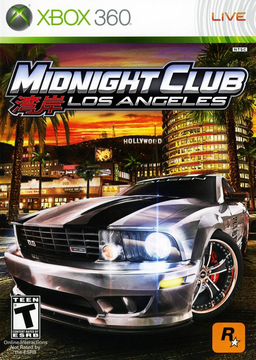
PC port of Midnight Club: Los Angeles
- RecompilationPort Type
- RenanQueirozDeveloper
- 12 Nov 2026Page Updated
Details
- Developer
- RenanQueiroz
- Port Type
- RecompilationA tool translated the game's original machine code into C automatically, which was then built as a native PC program.
- AI Use
- Not statedThe developers haven't said whether they used AI.
- Source Code
- GitHub
- mcla-recomp (Original Project)
- GitHub
- ReXGlue SDK
- GitHub
- Page Updated
Platform Support
- Windows
Screenshots
545407F8), as a disc image (.iso) from your own disc. Windows 10 or 11 64-bit with a Direct3D 12 graphics card, about 10 GB of free space and an internet connection for the first build.Overview
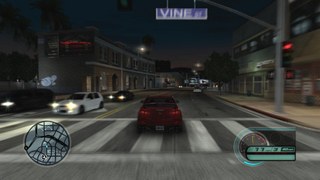
MCLA Recomp is RenanQueiroz’s fork of mcla-recomp by holdmysocks, the static recompilation of the Xbox 360’s Midnight Club: Los Angeles Complete Edition to native code, built on the ReXGlue SDK. Neither the repository nor the download contains any game code: the launcher’s setup wizard downloads the build tools and builds the game on the player’s own PC from their own disc image, then prepares the shaders so places don’t stutter the first time they’re seen.
On top of the original project the fork adds performance work on both the Direct3D 12 and Vulkan renderers so that higher resolutions and frame rates hold, with 30 to 120 frames a second or uncapped at native 720p, 2x or 3x (4K). It also adds HDR, FSR 3.1 upscaling and frame generation, and several game fixes, almost all of which can be turned off for testing. Changes meant for the original project are offered back to it.
The fork’s additions were built and measured on Windows with an NVIDIA graphics card; career, races, the garage, audio and controllers play with Direct3D 12, while the Vulkan renderer runs but has not been played through. The original project also has Linux and jailbroken PS5 builds, which this fork’s download doesn’t cover.
How to Set It Up
- Download
MCLA-Setup.exeand run it. It isn’t signed, so Windows may warn: choose More info, then Run anyway. It installs the launcher for your Windows user, with no administrator prompt. - In the launcher’s setup wizard, pick a folder (its path can be at most 129 characters) and your disc image. It downloads the build tools, builds the game from your disc and prepares the shaders.
- Press Play. The launcher’s settings and the pause menu’s Settings tab change the same options.
- When a new release is out, the launcher offers Update and rebuild, keeping your settings and saves.
Advertisement
Download MCLA Recomp
What's new in v0.3.11
A release after v0.3.10. The launcher builds Midnight Club: Los Angeles Complete Edition (Xbox 360, USA/Europe, title 545407F8) from your own disc image; no game data is in any of the files below.
What changed
- The setup no longer stops with “tar.exe is not recognized” (#73): the build unpacks the SDK with Windows’ own
tar.exe, and a PC whose Windows has none, or whose PATH leaves outC:\Windows\System32, could not find it. The build now unpacks it another way whentar.exeis not there.
Everything else is as in v0.3.10.
Not tested
Tried on one PC (Ryzen 7 9800X3D, RTX 5080, Windows 11): the update from v0.3.10 and a new install. The fix itself: the SDK unpacked with tar.exe, with a PATH without System32 and with no tar.exe at all, each giving the same files. Not tried here: a Windows that really has no tar.exe, an AMD card, Linux, the PS5 build. Please tell us how it went in the issues.
Installing or updating
Already have a v0.3 release? Open the launcher and press Update and rebuild when it shows An update is available. Updating from v0.3.9 or earlier was not tried for this release.
New install: download MCLA-Setup.exe and run it. It is unsigned, so Windows SmartScreen may stop it: click More info, then Run anyway. The setup wizard then builds the game from your .iso; it needs the internet and about 10 GB of disk.
Files
Release v0.3.11, built from commit 15004085bbf233715af65c2243e8cbd79a2ea12b by
| Asset | Size | SHA-256 |
|---|---|---|
MCLA-Setup.exe | 58.6 MB | 83821c95f6bb762a6c8ad2c45fc26c87eda6dfb2f3eca4d56d20cc6189f0406f |
MCLA-Launcher-v0.3.11-win-x64.zip | 70.4 MB | dc79d5e2128ae9b97c874f263774a285de70ec351050f0d173d182ebee642d59 |
rexglue-sdk-f5337cdc-7bb14d86c7e0-llvm-mingw-20250709.zip | 28.1 MB | c7bef2a882fb4a47d86eb43b5b6d5d5b34641c6792d1733acb7961c15d8e9cf1 |
rexglue-sdk-source-f5337cdc-7bb14d86c7e0.tar.xz | 73.4 MB | 9cf1c9f67d9b7780685119cb33e82c54e0a8e4351a3f5dc1e3d8ede4f5faa1cb |
release.json | 8.1 KB | 2f566c5697067cb4a24ad518b9b6eeb38ecbb12541b4cc029f89545df6fa2fc9 |
NOTICES.txt | 32.7 KB | 7425107d2e35d2ef7905ced707cccd424dc8ec5c020ab5dfe6daa63900c40ede |
SHA256SUMS | the sums of the six above |
release.json is what the launcher’s installer reads; NOTICES.txt has the licences and notices of everything in the assets. Every asset has a build-provenance attestation (gh attestation verify -R RenanQueiroz/mcla-recomp).
- MCLA-Setup.exe: the one file a player downloads. Run it: it installs the launcher for the current user (no administrator rights asked for) in
%LOCALAPPDATA%\Programs\MCLA, makes a Start menu and a desktop shortcut and starts it; the launcher’s setup wizard then builds the game from the player’s own disc image. Unsigned, so Windows SmartScreen may warn (the README says how to go on). The launcher updates itself by downloading this asset (SHA-256 inrelease.json) and running it with--update. - Launcher zip: the same launcher folder as a zip, for anyone who wants it without the installer: unzip and run
MclaLauncher.exe; .NET and the Windows App SDK are inside. Unsigned. - SDK bundle: the ReXGlue SDK (f5337cdc) with the fork’s 75 patches (digest
7bb14d86c7e0), built with llvm-mingw 20250709, and FSR’s two runtimes (FidelityFXeee08db1, built with the C runtime linked in, so no Visual C++ Redistributable is needed).scripts/make_pc.ps1 -Toolchain mingw -SdkBundle -SdkBundleSha256uses it. - Source archive: the corresponding source of the bundle’s GPL and LGPL parts (the SDK tree at the pinned commits with the patches applied, and the fork at this commit).
gameinrelease.jsonholds the fingerprints of the supported game (names, sizes and SHA-256 of its files: no content) for the launcher’s setup wizard.
…
dc79d5e2128ae9b97c874f263774a285de70ec351050f0d173d182ebee642d59
83821c95f6bb762a6c8ad2c45fc26c87eda6dfb2f3eca4d56d20cc6189f0406f
81cfcb401348a8103592c8b76198b0ffec88f9d22e62e692d380c7465513eabd