SDOJ Recomp
PC port of DoDonPachi SaiDaiOuJou
- RecompilationPort Type
- eandisDeveloper
- 30 Sep 2026Page Updated
Details
- Developer
- eandis
- Port Type
- RecompilationA tool translated the game's original machine code into C automatically, which was then built as a native PC program.
- AI Use
- Not statedThe developers haven't said whether they used AI.
- Source Code
- GitHub
- Page Updated
Platform Support
- Windows
- Linux
ScreenshotsView All (5)



Overview
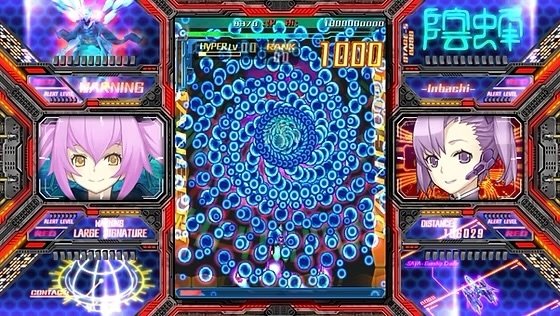
SDOJ Recomp is a native port of DoDonPachi SaiDaiOuJou for Windows and Linux, made by static recompilation with ReXGlue. It works with both the disc and the Games on Demand release, with Title Update 1.01 applied.
Two patches cut input lag from three frames to one, and can be turned off in the launch script. Slowdown has been tuned to match the arcade game for the normal and expert modes; Xbox Arrange mode runs without slowdown. Settings are in an F4 menu, and keyboard play is supported.
It is published as pre-releases. The author notes graphical glitches from the render patch, uneven frame delivery and audio fade-out problems unless the game is run through Special K. The download contains no game data. It needs DoDonPachi SaiDaiOuJou for Xbox 360 and its Title Update 1.01, dumped from your own copy.
How to Set It Up
- Download the zip for Windows or the tarball for Linux and extract it.
- Put your SaiDaiOuJou ISO and the TU1 file next to the executable. For the Games on Demand release, extract
CA022100.binp,CA022110.binpanddefault.xexpfrom the matching TU file instead. - Run
launch.bat(launch.shon Linux). The first launch extracts the ISO and installs the update intogame_data; after that the ISO and TU file can be removed. - Press F4 in game for settings. Turn on
mnk_modein the Input tab to play with a keyboard.