
Shadow Recompiled
PC port of Shadow the Hedgehog
- RecompilationPort Type
- FoxWorkshopDeveloper
- 17 Nov 2026Page Updated
Overview
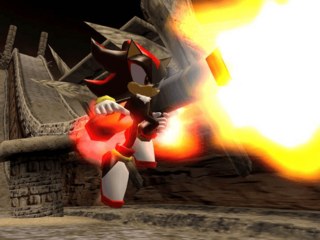
Shadow Recompiled is a native port of the original Xbox version of Shadow the Hedgehog (2005) for Windows and Linux, made by FoxWorkshop through static recompilation. XboxRecomp2 turns the game’s x86 code into C++, in the way XenonRecomp did for Sonic Unleashed Recompiled.
A built-in installer with integrity checks sets the game up, and a new options menu replaces the original settings, usable with a controller. It supports 16:9, 16:10 and ultrawide displays with UI alignment options, high frame rates with the glitches they cause fixed, and an unlocked frame rate in cutscenes. It also overhauls the bloom, raises the sound effect limit, fixes edge artifacts, animated textures, the Space Gadget’s gravity bugs and Xbox-only audio and graphics glitches, lets every cutscene be skipped and lets player 2 control the partner. Achievements are added in a new pause menu, and a mod loader works with SA Mod Manager.
The download contains no game data. It needs the Xbox version of the game, from your own copy.
How to Set It Up
- Download the Windows zip, the Linux tar.gz, or the Flatpak for the Steam Deck, and extract or install it where you want the game.
- Start Shadow Recompiled. Its installer asks for the files from your own Xbox copy and checks them.
- Play. To update, copy a new release over the old one; launch with
--installto run the installer again.
Advertisement
Download Shadow Recompiled
What's new in v1.0.0
Important
No game files are included.
You need your own Xbox copy of the game to install or build Shadow Recompiled.
Watch out
If your antivirus software flags Shadow Recompiled, it is a false positive. Builds downloaded from this page are always going to be safe.
If you run into visual issues, try updating your graphics drivers. Or switching between D3D12/Vulkan.
Which backend is faster depends on GPU.
Downloads
- Windows
- Linux
- Linux (Flatpak) (👈 Steam Deck)
Misc:
- Release Info
- Debug Symbols
a2ff573bbea94d317482e5022189abd7ec77a6e4695cee349b062dbc0c8a40e6
8a1466c9636703deeb1976e6ca4ebe807813cbf8ebd7b336bf5067313850c3a4
c3770efc05f55e2fbcd92d23b93c06e6d522dbd435f1b123954dd6a7f9ddee34
428875034b10a50d1014e55adb670fd369fc805cb38db3163aa5539270cad47b