Red Dead Revolver XBE Recomp
PC port of Red Dead Revolver
- RecompilationPort Type
- TGP482Developer
- 12 Nov 2026Page Updated
Details
Platform Support
- Windows
Screenshots
Overview
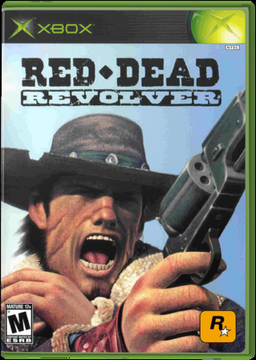
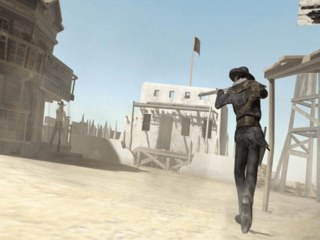
Red Dead Revolver XBE Recomp is an unofficial native Windows port of the Xbox version of Rockstar’s 2004 western shooter, made with TGP482’s Xbox XBE Recomp tool, the same tool behind the 007: From Russia with Love and Splinter Cell: Double Agent ports. The download holds the port’s program but none of the game: the first start reads the player’s own disc image or files and compiles the game’s code for that PC, once.
The original 640x480 picture gives way to any resolution the monitor reports, with render scaling from 20% to 200%, a field of view from 45 to 140 degrees, a custom or uncapped frame rate, HDR10 output and a choice of filling the screen with the movies or keeping them 4:3. MSAA, SMAA, anisotropic filtering and SSAO or GTAO ambient occlusion can be added, the letterbox bars and the screen blur can be turned off, and colour blind modes are included.
Keyboard and mouse use raw input, controllers work through SDL3, and controllers with motion sensors can aim with gyro alongside the right stick. Textures can be dumped and replaced with the player’s own, and the game can be played in English, French, German, Italian or Spanish.
How to Set It Up
- Download the zip and extract it into a folder of its own.
- Put your ISO, or the extracted disc files, in the
assetsfolder. - Run
RDR.exe. The first start compiles the game’s code for your PC, which happens only once. - Change the display, graphics and control settings in the in-game options menu or the overlay opened with F10.
Advertisement
Download Red Dead Revolver XBE Recomp
What's new in v2RDR XBERecomp V2
General
- Letterbox Setting - Added a Letterbox setting that turns off the black bars during gameplay and cutscenes.
- Main Menu Exit - Added an Exit game option to the main menu.
Fixes
- Mouse Aim In Cover - Fixed mouse look not working while aiming in cover.
- Showdown Start - Fixed Enter not starting a Showdown match.
- Showdown Loading Screen - Fixed the Showdown loading screen being stretched on widescreen.
- Split Screen HUD - Fixed the split screen HUD being covered by the view’s border on widescreen.
- Pixelated Text - Fixed the respawn text and button prompt text looking pixelated at higher resolutions.
- Ammo Glow - Fixed the glow behind the ammo counter not lining up with it on widescreen and at higher resolutions.
- Letterbox Line - Fixed a thin line between the letterbox bars and the HUD at higher resolutions.
- Prompt Bar - Fixed the PC key prompts on the button bar being misplaced when the bar first shows.
- Cutscene FMVs - Fixed the cutscene FMVs being cropped, so they keep their 16:9 frame with FMV Scale set to Fill or 4:3.
6483eb8e4f23bcc1dd4847ef6ea75d1d1fe2c7545d3d3581e05b7271969ade99
e7ea2f209a444e96270cad2428daa6572e0bc9c38affef7532b28b73b5dd52fa