
MechAssault 2 PC Recomp
PC port of MechAssault 2: Lone Wolf
- RecompilationPort Type
- MazillionDeveloper
- 18 Nov 2026Page Updated
Details
- Developer
- Mazillion
- Port Type
- RecompilationA tool translated the game's original machine code into C automatically, which was then built as a native PC program.
- AI Use
- AI-assistedThe project says: “AI coding tools were used in making this project.” Source
- Logo
- AI-made fan logo, free to use · Full size
- Source Code
- GitHub
- Page Updated
Platform Support
- Windows
Screenshots
Overview
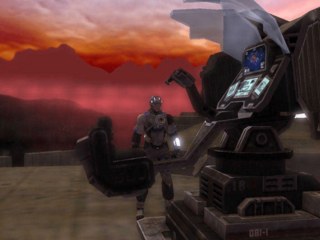
MechAssault 2 PC Recomp is an unofficial port of MechAssault 2: Lone Wolf, Day 1 Studios’ 2004 Xbox game, which never had a PC release. Its installer takes the code from the player’s own disc and recompiles it into a native Windows program with sp00nz’s xboxrecomp toolkit, then lays a PC layer on top for graphics, input and settings. The game’s code runs natively, while the Xbox’s audio chip and graphics processor are still emulated with code adapted from xemu. No game files are in the download.
The whole single-player campaign is there, at any resolution including widescreen and ultrawide with the HUD refitted, at up to 360 frames per second, with a longer draw distance and cutscenes that fill a wide screen at 60 FPS. Keyboard and mouse and controllers can both be rebound and swapped mid-game, with button prompts that follow whichever is in use, and the menus respond to the mouse. Optional 2x or 4x upscaled textures can be generated on the player’s own PC, which needs an NVIDIA card and takes hours.
Every multiplayer mode can be played offline against up to six bots a side on every map, at five difficulty levels. The bots play for the objective, use ‘Mechs, tanks, VTOLs and Battle Armor, and never get extra damage or armour on harder settings. A scenario editor installs alongside the game for building campaign missions with objectives, triggers and cutscenes, or multiplayer maps that also work with bots, and a Test button drops straight into them. Online play and split screen are not supported, only the US disc works, AMD graphics cards are untested, and the developer has not yet played every mission through to the end on this build.
How to Set It Up
- Run
MechAssault 2 Recomp Installer.exe. It isn’t signed, so on Windows SmartScreen’s warning choose More info, then Run anyway. Smart App Control blocks it outright; the install guide that comes with it covers that. - Point it at your disc dump. It downloads FFmpeg for the cutscenes and the C++ Build Tools if they are missing.
- Wait while it builds the game on your PC, around 15 minutes on an 8-core processor, then start MechAssault 2 from the shortcut it makes.
- Run the installer again later to update, repair or uninstall. If the game crashes, its Collect diagnostics button makes a zip to attach to a bug report.
Advertisement
Download MechAssault 2 PC Recomp
What's new in v1.1.0MechAssault 2 PC Recomp 1.1.0
First public release. It runs stable on my systems, but your mileage may vary. The bots and the scenario editor are still rough in places, but they’re good enough to have fun with.
You need your own MechAssault 2 disc (US/NTSC retail). There are no game files in this release. The installer builds the game on your PC from your disc dump.
What’s in it
- The full campaign, with widescreen and ultrawide, high frame rates, keyboard and mouse, and extended draw distance
- Offline bot matches in every multiplayer mode, with 5 difficulty levels
- The scenario editor, for making your own campaign missions and multiplayer maps
Installing
- Dump your own disc to an ISO/XISO or a folder.
- Download
MechAssault 2 Recomp Installer.exebelow. - Run it and point it at the dump. It takes around 15 minutes to build the game.
You need Windows 10 or 11 (64-bit), a GPU that does Direct3D 11, about 5 GB of free space and an internet connection during the install. The README has the details.
The installer isn’t signed, so Windows SmartScreen will warn you about it. Click “More info”, then “Run anyway”. If Smart App Control is on, see the install guide.
SHA-256 of the installer (22,762,381 bytes):
725cb78021281307ae2ec2e5adf6d00713621c5d885a26876a443c8a42e407f2
Known issues
- Tested mainly on a desktop with an RTX 3090 and an i9-12900K, and to a lesser extent on a laptop with an i7-1260P and Iris Xe graphics. AMD graphics cards haven’t been tested.
- The automatic Build Tools install hasn’t been tried on a PC that never had Visual Studio.
- The first load of each level can stutter for a few seconds while shaders compile.
- Bots sometimes get stuck for a moment.
The full list is in Known issues.txt. If something breaks, run the installer again, hit “Collect diagnostics” and attach the zip it makes to an issue.
Not affiliated with or endorsed by Microsoft, Day 1 Studios or any BattleTech / MechWarrior rights holder.
725cb78021281307ae2ec2e5adf6d00713621c5d885a26876a443c8a42e407f2