JSRF Recomp
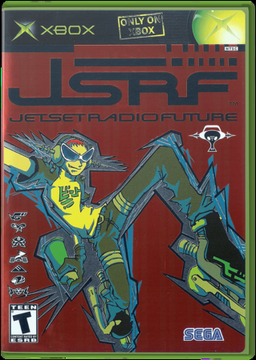
PC port of Jet Set Radio Future
- RecompilationPort Type
- MiggasDeveloper
- 2 Nov 2026Page Updated
Details
Platform Support
- Windows
- Linux
Screenshots
default.xbe and the folders next to it) or as a disc image. Windows 10 or 11, Linux or a Steam Deck, an OpenGL 3.3 graphics card, about 3 GB free, and an internet connection the first time for the build tools.Overview
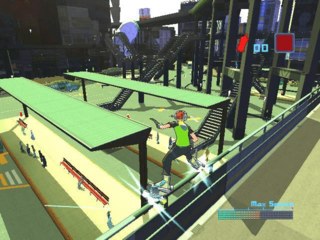
JSRF Recomp turns Jet Set Radio Future, Smilebit’s 2002 Xbox game, into a native program for Windows, Linux and the Steam Deck. It is not an emulator: the game’s own program is translated into C once, on the player’s computer, and compiled, while a runtime recreates the Xbox’s graphics, sound, controllers and memory card.
Nothing from the game is in the project. The launcher downloads its own tools, checks the player’s default.xbe and builds the game from it, and only the North American retail release works, because the European and Japanese ones are built differently inside.
The developer says most of the project’s code was written by Claude, Anthropic’s AI, directed, tested and played through by them.
How to Set It Up
- Download the launcher for Windows or Linux and unpack it into an empty folder with a short path (not a synced folder such as OneDrive). On Linux, mark
jsrf_launcheras executable. - Start it. It makes a
jsrffolder next to itself: copy all of the game’s files into it, so thatjsrf\default.xbeexists, or choose your game folder in Play. - Press Update > Download to get the project and its build tools (Python, the Zig compiler and CMake, about 150 MB).
- Press Play > Build. It checks your
default.xbe, translates the game into C and compiles it, in 10 to 20 minutes the first time. - Click PLAY, or start
jsrf_recompin the game folder. F11 switches between a window and fullscreen.
Advertisement
Download JSRF Recomp
What's new in v1tFirst Release
JSRF Launcher v1t: first release
The launcher sets up, builds, updates and starts the Jet Set Radio Future recompilation for you, on Windows, Linux and the Steam Deck. You need your own copy of the game (NTSC retail default.xbe).
What it does
- Update → Download: gets the project and the build tools (about 150 MB). No other installs needed.
- Build: checks your
default.xbe, generates the code and builds the game into your game folder. Each step skips what is already up to date. - Play: shows what is ready (✓ / ✗) and starts the game. Click a ✗ to go where it is fixed.
- Settings: edits
jsrf.iniin tabs (Gameplay, Video, Input, Audio, Debug, All settings). Your changes are kept through updates. - Update: gets the newest version of the project, and updates the launcher itself with Update launcher.
Controller and Steam Deck
- Works with a controller: the d-pad moves between buttons, A presses, B closes a list, LB / RB change tab, Start plays. The settings lists scroll as you go down.
- Works with the touchscreen.
- Closes when the game starts, so it can be added to Steam as the game’s entry.
- Builds and runs natively on the Steam Deck, no Proton needed. Works in Game Mode.
Downloads
jsrf_launcher: Linux / Steam Deckjsrf_launcher.exe: Windows
Put it in an empty folder and start it. The README explains each step.
Everything the launcher does is written to launcher_log.txt next to it. Include that file when reporting a problem.
6f21631d61c3d54beef82a022ff5d71f8a96beed9a2385da5a89839daddbc292
71780f6083979ecfb70530079d5d8d897a2c64fa236348287ee2e7c19b0836ff