Def Jam: Fight for NY PC Port
PC port of Def Jam: Fight for NY
- RecompilationPort Type
- vh-ssantosDeveloper
- 19 Oct 2026Page Updated
Details
- Developer
- vh-ssantos
- Port Type
- RecompilationA tool translated the game's original machine code into C automatically, which was then built as a native PC program.
- AI Use
- AI-assistedThe project says (in Portuguese) that it was made by vh-ssantos with Claude (Anthropic), via Claude Code. Source
- Source Code
- GitHub
- Xbox XBE Recomp (Tool)
- GitHub
- Page Updated
Platform Support
- Windows
Screenshots

.iso of Def Jam: Fight for NY (USA) for the Xbox, made from your own disc, or its extracted files. Windows 10 or 11 64-bit and a Direct3D 12 graphics card.Overview
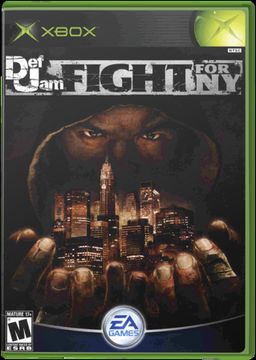
This is a free, unofficial native Windows port of the Xbox version of Def Jam: Fight for NY. It is not an emulator: the game’s code is recompiled with TGP482’s Xbox XBE Recomp tool, the same one behind the BLACK port, and runs with Direct3D 12 graphics, XAudio2 sound and SDL controllers. The game files come from the player’s own US disc image.
It runs at any resolution with the game’s own widescreen mode and up to 300% supersampling, holds a steady 60 frames per second and adds anisotropic filtering and SSAO or GTAO ambient occlusion. Xbox, PlayStation and Switch controllers work with vibration, with up to four players in Battle mode. Full keyboard and mouse mapping is planned for a later version.
A PC options menu also unlocks the game’s own cheats, lets the next User ID name be typed on the keyboard, skips the intro videos, pauses in fullscreen when switching away and opens the save folder. The port checks GitHub for new versions and can update itself; the check can be turned off in settings.toml. The project’s own pages are in Portuguese.
How to Set It Up
- Download the zip and extract it into a folder of its own.
- Put your
.isoin theassetsfolder, or startDefJamFFNY.exewithout it and choose the.isowhen asked; it is copied intoassets. - Run
DefJamFFNY.exe. - Press F10, or BACK + START on a controller, for the PC options menu.