DOA2U Native PC Port
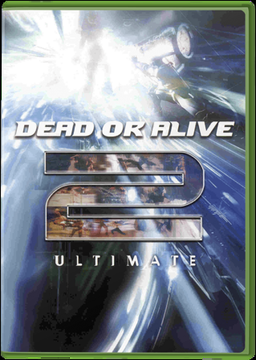
PC port of Dead or Alive 2 Ultimate
- RecompilationPort Type
- NoRain211Developer
- 28 Oct 2026Page Updated
Details
- Developer
- NoRain211
- Port Type
- RecompilationA tool translated the game's original machine code into C automatically, which was then built as a native PC program.
- AI Use
- AI-assistedThe project says: “This project uses large language models and AI coding agents extensively for code, reverse-engineering analysis, debugging, tests and documentation.” Source
- Source Code
- GitHub
- Page Updated
Platform Support
- Windows
- Linux
- macOS
Screenshots
Overview
DOA2U Native PC Port brings Dead or Alive 2 Ultimate, the Xbox remake of Team Ninja’s fighting game found on the second disc of Dead or Alive Ultimate, to Windows, macOS and Linux. The game’s executable is lifted to C by a static recompiler and linked against a runtime that stands in for the Xbox kernel, Direct3D 8, DirectSound and input libraries, using Direct3D 11, XAudio2 and SDL3 on Windows and SDL_GPU with Metal or Vulkan elsewhere. The longer-term goal is to replace the generated code with readable, hand-written game logic.
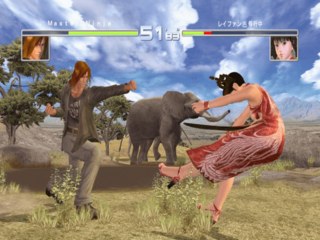
It is alpha software. Menus, character select, the attract demo, Watch mode and Story on every stage play, and every ending and its credits have been seen, but many modes and characters are still untested, and a draw the port can’t render yet stops the game with a message in its log. The Xbox Live menus also stop the game, as there is no online service.
On Windows it renders at 480p up to 4K with the game’s own 16:9 widescreen mode, MSAA up to 32x and SMAA, paced at 60 FPS like the Xbox. Music, voices, 3D voice positioning, reverb and the 5.1 mix play, along with the intro and story movies. Controllers work through SDL3 and the keyboard drives player 1, and every character and costume starts unlocked. The macOS and Linux builds, including the Steam Deck, reach the menus and attract demo at 60 FPS.
The download holds only the tools and source: the game is built on the player’s own computer from their Disc 2 image, and the build refuses any executable other than the one the developers tested.
How to Set It Up
- Download the zip for your system and extract it into a new folder with a short path, such as
C:\DOA2U. - On Windows, drag your Disc 2 ISO onto
BuildGame.cmdand wait for Build complete (about 15 minutes). On macOS and Linux, follow the project’s building guide instead. - Run
play.cmd, choose the resolution, anti-aliasing, widescreen, intro skip and 5.1 surround, then press Play.