Blood Wake Recomp
PC port of Blood Wake
- RecompilationPort Type
- minimalice92Developer
- 6 Nov 2026Page Updated
Details
- Developer
- minimalice92
- Port Type
- RecompilationA tool translated the game's original machine code into C automatically, which was then built as a native PC program.
- Game
- Blood Wake
- AI Use
- Mostly AI-builtThe project says: “The engineering was done by Claude, Anthropic's AI model: a lead session plus 80+ AI agents working in batches” Source
- Source Code
- GitHub
- xboxrecomp (Tool)
- GitHub
- Page Updated
Platform Support
- Windows
Screenshots
Overview
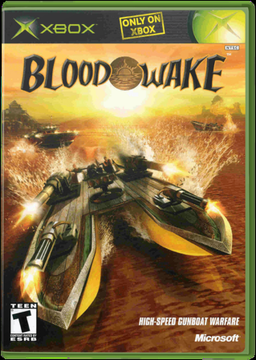
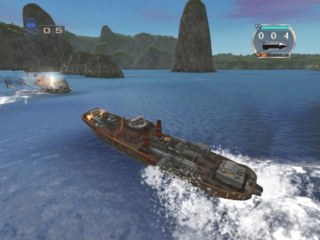
Blood Wake Recomp is an unofficial native Windows port of Stormfront Studios’ 2001 Xbox gunboat game. Its program is statically recompiled to C with the xboxrecomp toolkit and built with Microsoft’s compiler, while the toolkit’s runtime stands in for the console’s system, memory, sound chip and controllers and the port’s own Direct3D 11 back end draws the game’s graphics. Every function in the game is translated, and all 28 story missions, Battle Mode and two to four player split screen play through.
No game code comes with the download. The installer checks the player’s own disc copy, fetches the free build tools it needs, then translates and compiles the game on their PC, which takes about 15 minutes. Running a newer installer over an older install updates it and keeps saves and settings.
The launcher offers two editions. Original plays the game as it shipped, at 4:3 and 30 frames a second on the console’s 59.94 Hz clock with its own saves and the sound chip’s echo and 3D sound effects. Remastered keeps the original art and sound but adds 16:9 and 21:9 widescreen, native resolutions up to 4K, anti-aliasing and texture filtering, a longer draw distance, HDR mapped from the screen’s own data, up to about 290 frames a second while the game still ticks at 30, surround sound, key remapping, cheats and 17 switchable fixes for bugs in the 2001 release. The developer says the engineering was done by Claude, Anthropic’s AI model, with the maintainer directing it and testing the game.
How to Set It Up
- Download
BloodWakeRecomp-Setup-<version>.exeand run it. It isn’t code-signed, so Windows may warn: choose More info, then Run anyway. - Accept the disclaimer and choose your copy of the disc. Setup says whether it recognises it, and warns before building from another version or a modified copy.
- Pick the install folder and shortcuts, then let it build the game from your disc: about 15 minutes, ending with a short graphics warm-up so the first game doesn’t stutter.
- Play from the Start menu or desktop shortcut, and pick Original or Remastered in the launcher. To update, run a newer installer into the same folder: saves and settings are kept.
Advertisement
Download Blood Wake Recomp
What's new in v0.3.1Blood Wake Recomp 0.3.1
0.3.1: native graphics. All of the Xbox graphics chip’s drawing now runs on your graphics card, in both editions, and the loading screen is back. Remastered’s frames are about 11 ms fresher when the graphics card finishes them, and a press reaches the screen about 5 ms sooner. The sound now plays at the game’s own level, with nothing squashed. A new High Priority Mode asks Windows not to slow the game down to save power. The game itself hasn’t changed: Original still plays step for step as it shipped.
The loading screen is back (both editions)
- Every load used to show a black screen with only the caption. Now it shows the Blood Wake picture and the little red bar sweeping while the game reads its files, as on the console.
- The game paints that screen with the processor, straight into the picture’s memory, and until now the port never looked there. Only the loading screen changes: every other frame is identical.
All of the drawing on your graphics card (both editions)
- The last pieces the processor still drew in the graphics chip’s place now run on your graphics card: the rain splashes and spray around the boats, the sky dome and some beach props.
- The same pictures, to within about 25 pixels in a million, nearly all by one shade. Measured over the recorded test scenes against 0.3.0’s pictures, piece by piece (a shade is one step of the 256 each colour has):
- Rain splashes and spray: under one pixel in a million differs: 1,095 of 1.29 billion over every frame of the rain and spray scenes (Original 120 of 553 million, Remastered 975 of 737 million). 93% of them change by one shade, which you can’t see; the largest by 8 shades, about 3% lighter or darker. They are single pixels or tiny groups on or right beside a splash, about as many a shade lighter as darker, and none stays: in the next frame it’s gone.
- The sky and beach props: about 25 pixels in a million in Original (1,171 of 47.3 million) and 22 in Remastered (515 of 23.3 million). Nearly all change by one shade (Original 99.6%, three in four of them on one colour only; Remastered 94%). They barely lean either way: in Original about as many get lighter as darker, in every colour; in Remastered a few more get darker than lighter, mostly in blue. They are single pixels, most of them in the sky (Original 94%, Remastered about two thirds; the rest on props, the sea and the HUD’s edges), and they don’t stay put: in the next frame, a changed pixel is never in the same place. The largest change: one pixel at the picture’s very edge in Original, 24 shades darker in blue (about 9%); in Remastered, a few pixels along one edge in the 4-player split screen, up to 7 shades darker in blue (under 3%).
- For scale: Microsoft’s software renderer and our graphics card, both drawing correctly, disagree on about 60% of a mission frame’s pixels.
- No first-time stutter in play. The first time the game used one of its drawing programs, the graphics card’s version wasn’t ready yet, so for a few frames the processor drew those shapes instead, or the game paused for a moment. The game makes all of its drawing programs when it starts, so they are now all prepared while the first loading screen is up (about a second, on spare cores). In our tests, each started from an empty cache, play met none that wasn’t ready: the longest wait for a drawing program after the loading screen was 1 ms. The one exception is the very first loading screen after installing, before anything is prepared: it may pause for a moment (up to about 40 ms in Original, once) while the last programs finish. After that they come from the cache.
- Original too. It now gets the same native treatment, with its pictures within the same tiny margins (the figures above).
Fresher frames in Remastered
- A new latency mode, on by default: each frame is started just in time for the graphics card instead of waiting in a queue behind older ones.
…
23d86c9f1367e6cec30cbf7a84718f27be5a61418b25a9374f658db4c4cb128a
4945bb5dbe0701ba7381a4f91e8f10742f0ffd4c6bc8a1a5d2e565ecc8dffb97