Dirt Dash PC Port
PC port of Dirt Dash
- DecompilationPort Type
- spacestate1Developer
- 8 Nov 2026Page Updated
Details
- Developer
- spacestate1
- Port Type
- DecompilationThe game's code was rewritten by hand as source code that builds back into the same game, then made to run natively on PC.
- Game
- Dirt Dash
- AI Use
- AI-assistedAn AI coding tool is credited as co-author on 70 of the repository's 94 commits. Source
- Source Code
- GitHub
- Page Updated
Platform Support
- Windows
- Linux
Screenshots

dirtdash set (dirtdash.zip), from MAME 0.271 or later, dumped from your own board. The DSP’s BIOS is built in, so no c71.bin or namcoc71.zip is needed.Overview
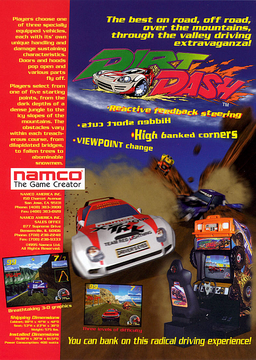
Dirt Dash PC Port is a native PC port of Namco’s 1995 arcade game Dirt Dash for Windows and Linux, including the Steam Deck. It is one of the Namco System 21, 22 and 23 games rebuilt by the namco22-decompile project (now titled Namco 2x Systems), which took each game’s program apart with Ghidra and checked it piece by piece against the arcade machine running in MAME. The Windows zip and the .deb contain every game; the AppImage contains only this one.
Dirt Dash is playable through its five stages, with sound and an optional widescreen picture. Its main program is translated to C by a tool of the project, and its DSP and sound programs are turned into C from the player’s own ROMs when the game is prepared. A stage can be chosen at start, and the port adds a menu with screen, sound and key settings, analogue stick steering with several response curves, pausing, full screen, screenshots and controller support.
The downloads contain no game files, apart from the board’s DSP BIOS, which is built into the program. It needs the game’s MAME ROM set, dumped from your own board.
How to Set It Up
- Download one package: the Windows zip, the
.deb(Ubuntu 22.04+, Linux Mint 21+, Debian 12+), which hold every game in the project, or the Dirt Dash AppImage for the Steam Deck and other Linux systems. - Windows: unzip it anywhere, put
dirtdash.zipin itsromsfolder and double-clickDirtDash.exe. - Linux: install the package and start Dirt Dash from the applications menu (or type
dirtdash). The first time it makes~/.local/share/namco-2x-systems/<game>/roms, says which zip is missing and copies any it finds in~/Downloads. - AppImage: make it executable, put your zips in that same folder or next to the AppImage, and run it. On a Steam Deck, add it to Steam from Desktop Mode; the menu opens with R3 or by holding Start.
Advertisement
Download Dirt Dash PC Port
What's new in v0.10.3
Wheel force feedback (#73)
For players whose wheel loses its force feedback a few seconds into a race, or at full lock (reported on Simagic direct-drive bases). Two new settings on the Controls page of every wheel game (Dirt Dash, Rave Racer, Ace Driver, Ridge Racer 2), saved in the game’s controls cfg:
- FFB keep-alive restart (
ffb_restart, default ON): the force is re-sent and re-started once a second, even while the wheel reports it as still playing. Turn it OFF to get 0.9.5’s behaviour (restart only when the wheel reports the force stopped) — for example if your wheel ticks once a second. - FFB log (
ffb_log, default OFF): one[FFB]line a second in the game’s log file — the force range sent, how many updates went out, the wheel’s own status (playing / stopped / not reported), update and restart failures with SDL’s error — plus the wheel’s capabilities when it is opened.
If force feedback still drops, please turn the log on, reproduce it, and attach the log to #73 with roughly when it dropped.
Tested on a virtual force-feedback wheel only; not yet on a real direct-drive base.
804a66fceb94cc12215b3bd38784aaf4d98fc1b0457a54e278ea2c1a6a707bf8
2fd95a0d0c1c8763e285d623afece08d1d8e82a1a696696ac616ceb3eff71b36
5c410d49359c39c314f5ca109fc50002be3bf185127f7bdf10b70c3fd8f45ad6
dc5641da1422c7ae530be1906a332b5d2395aa2e646d43ddc7072c6388901155